
10 Best Microsoft Visio Alternative Options to Try in 2026 (Free & Online Options Compared)
Microsoft Visio isn’t cheap — and in 2026, it’s starting to feel like a relic. You’re looking at $15 per user per month for Plan 2 if you’d rather subscribe through Microsoft 365. There’s a stripped-down Plan 1 at $5/month for web-only users, but the full desktop app? Still Windows-only. No native Mac version. Never has been.
That’s a problem for a lot of teams today. If your designers are on MacBooks, your support folks are bouncing between Chromebooks, or your whole workflow lives in the browser, Visio just doesn’t fit the way modern teams actually work anymore. You end up paying premium prices for a tool half your team can’t properly run.
So we did the legwork. This is a hands-on look at 10 Visio alternatives we actually tested in 2025–2026 — free options, browser-first tools, and full-blown collaboration platforms that, frankly, run circles around Visio when it comes to working together across devices.
Quick-pick summary: The Best Visio Alternatives At A Glance
In a hurry? Start with these picks based on the most common use cases.
- Best for teams + project management: Nifty + Miro integration (Combine projects with diagrams)
- Best overall alternative: Draw.io / Diagrams.net (free, powerful, ready-to-use templates)
- Best paid alternative: Lucidchart or SmartDraw (enterprise features, rich templates)
- Best free alternative: Draw.io (no paywalls, browser + desktop, ready to use templates)
- Best online/browser tool: Lucidchart or Miro (no install, strong collaboration)
- Best for Atlassian users: Gliffy (deep Jira/Confluence integration)
The sections below explain why each tool won and cover pricing, Visio file support, and platform compatibility.
Why look for a Microsoft Visio alternative in 2026?
If you’re reading this, something about Visio is probably bugging you. You’re not alone — review sites are full of people dealing with the same issues.
Visio is still a strong tool for complex engineering diagrams, no doubt. But for most people who just need a flowchart, an org chart, or a simple process map now and then? It’s too much. And too expensive. That’s why so many alternatives have caught up — and in many ways, do the job better.
Here’s what Visio actually costs:
- Visio Standard 2024: $309.99 one-time, perpetual license — Windows desktop only
- Visio Professional 2024: $579.99 one-time for the advanced feature set — also Windows-only
- Visio Plan 1: $5/user/month (annual) — browser-only, no desktop app
- Visio Plan 2: $15/user/month (annual) or $18/month (monthly) — adds the desktop app (No Mac)
Major pain points:
- Windows-only full desktop app (no true native Mac version; Mac users rely on web or workarounds)
- Steep learning curve, especially for casual users who just need a few flowcharts
- Connectors and auto-routing misbehave is one of the most common complaints, shapes drift, lines route weirdly, and editing big diagrams becomes a manual cleanup job.
- Historically limited real-time collaboration compared to modern web tools (Visio for the web improved, but still lags Miro/Lucidchart)
- License management is genuinely confusing. IT teams spend more time figuring out who needs what.
- Sharing is a hassle. VSDX files don’t open cleanly outside the Microsoft ecosystem.
What modern alternatives are doing better:
- True cross-platform use (Windows, macOS, Linux, web)
- Real-time multi-user editing, comments, and integrations with tools like Nifty, Jira, Slack, and Google Workspace
- AI-assisted diagramming that turns a prompt or a CSV into a working flowchart in seconds
- Pricing that doesn’t punish casual users
The bottom line: A lot of these tools were built specifically because Visio left gaps. They’re easier to onboard, friendlier across devices, and built for teams that don’t all sit on the same Windows laptops. If that sounds like your setup, you’ll probably find one of the picks below fits better than Visio ever did.
How to choose the best alternative by use case?
The right diagramming tool depends on what you use diagrams for—process mapping, software modeling, whiteboarding, or project management.
Key evaluation criteria:
- Diagram types: supports various diagram types including flowcharts, BPMN, UML diagrams, network diagrams, ERD, org charts, mind maps, wireframes.
- Collaboration: real-time editing, comments, version history, guest access (many diagramming tools now include in-app communication features to facilitate discussions)
- Visio compatibility: .VSD, .VSDX, .VDX import/export accuracy
- Platform support: Windows, macOS, Linux, browser, mobile apps
- Pricing model: truly free, freemium, or subscription-only
- Integrations: Microsoft Office, MS Office, Google Workspace, Jira/Confluence, Slack, Asana, Nifty
| Your use case | Recommended tool |
| Diagramming + project management | Nifty + Miro |
| Flowcharts & process maps (free) | Draw.io (Diagrams.net) |
| UML & software diagrams | Lucidchart |
| Team collaboration & whiteboarding | Miro |
| Network & IT diagrams | SmartDraw |
| Jira / Confluence integration | Gliffy |
| Mac users | OmniGraffle or Lucidchart |
Find your row, then jump to that tool’s section below. Each deep-dive includes pricing, Visio file support, and pros/cons.
Comparison table: Visio vs top 10 alternatives
This table compares key features side-by-side so you can scan quickly.
| Tool | Free plan? | Visio file import | Real-time collab | Platforms | Starting price |
| Nifty + Miro | Yes (limited free version) | Partial (via Miro) | Yes | Web, Windows, Mac, Mobile | $7/user/mo + $8/user/mo |
| Draw.io | Yes (unlimited free version) | Yes (.VSDX) | Via storage share | Web, Windows, Mac, Linux | $0 |
| Lucidchart | Yes (limited free version: 3 docs) | Yes (.VSDX) | Yes (100+ users) | Web | $7.95/user/mo |
| Miro | Yes (limited free version: 3 boards) | Partial | Yes (250+ users) | Web, Windows, Mac, Mobile | $8/user/mo |
| SmartDraw | No (trial, no free version) | Yes (best-in-class) | Yes | Web, Windows | $9.95/user/mo |
| Creately | Yes (limited free version: 3 docs) | Yes | Yes | Web, Windows, Mac | $5/user/mo |
| Gliffy | No (14-day trial, no free version) | Partial | Yes (Atlassian) | Web | $10/editor/mo |
| EdrawMax | No (trial, no free version) | Yes | Yes | Web, Windows, Mac, Linux | $99/year |
| Cacoo | Yes (limited free version: 25 sheets) | Limited | Yes | Web | $6/user/mo |
| OmniGraffle | No (trial, no free version) | Partial | No (export share) | Mac, iOS | $99 one-time |
Prices reflect 2026 annual-discounted USD rates.
Top 10 Microsoft Visio alternatives (detailed reviews)
This section covers each tool in depth, including best-for scenarios, key features, Visio import capabilities, pricing, and pros/cons.
Nifty + Miro
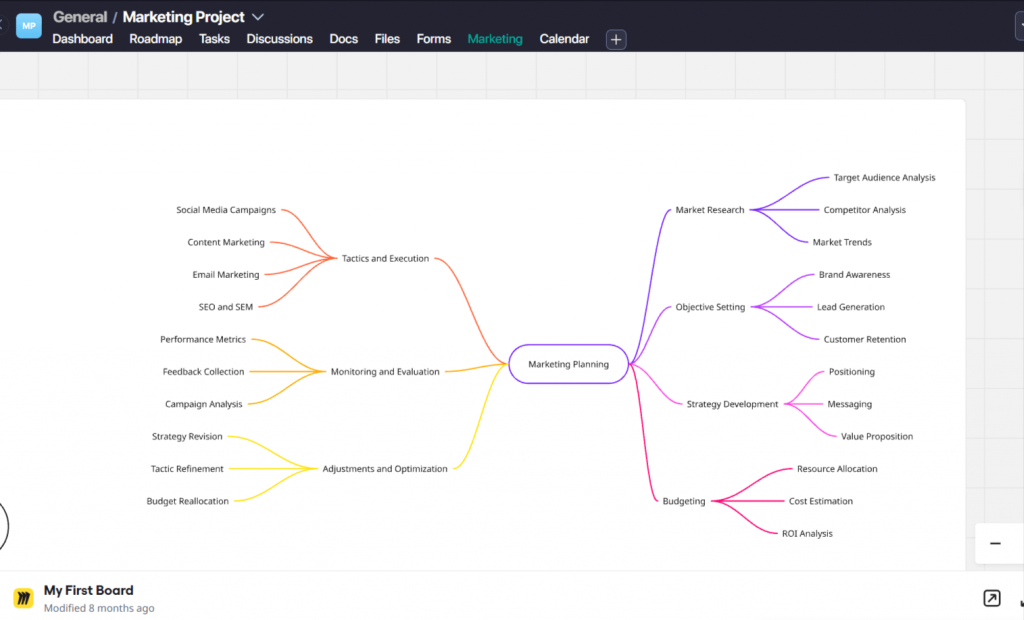
Best for: Product and project teams who want diagrams tied directly to tasks, milestones, and roadmaps. This combination bridges ideation and execution, reducing tool sprawl by connecting visual thinking with project delivery.
- Key features:
- Nifty manages roadmaps, tasks, docs, and timelines
- Miro handles whiteboarding with an infinite canvas
- Native integration embeds Miro boards into Nifty tasks
- 200+ templates for kanban, sprint planning, and product discovery
- Visio file import support: Partial—Nifty does not import Visio files; Miro offers
VSDX import via integration with some formatting caveats - Pricing: Nifty starter plan starts at $7/user/mo; Miro Starter at $8/user/mo
- Pros:
- End-to-end workflow hub from ideation to delivery
- Strong real-time collaboration features
- Browser-based access ideal for distributed teams (Mac, Windows, Desktop)
- Combines project management with visual collaboration
- Cons:
- Requires using two tools in tandem
- Visio import relies mainly on Miro and may be imperfect
Try The Best Microsoft Visio Alternative
Get Started
Draw.io / Diagrams.net
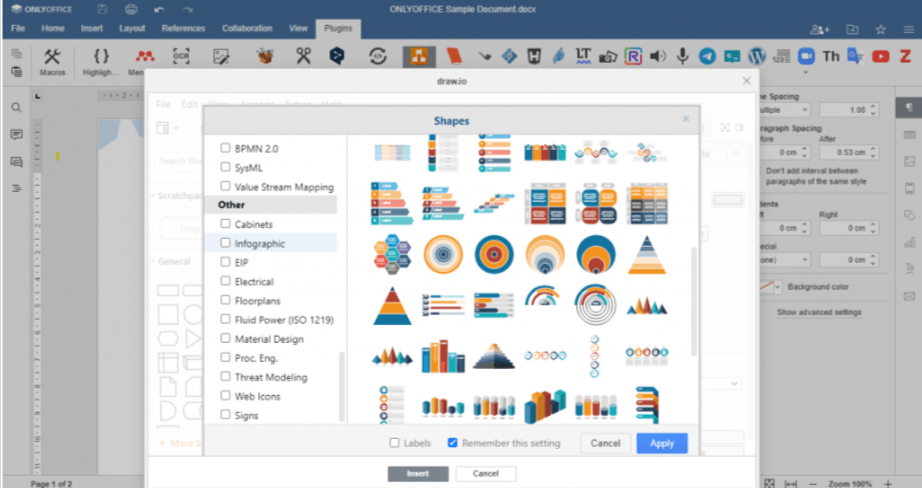
Best for: Anyone who wants a completely free, powerful diagramming tool that works online and offline. Draw.io and Lucidchart are widely considered the best overall alternatives to Microsoft Visio, with Draw.io standing out as the top free Visio alternative.
- Key features:
- Extensive shape libraries covering flowcharts, UML, network diagrams
- Saves to Google Drive, OneDrive, GitHub, and local storage
- Offline desktop apps for Windows, Mac, Linux
- Easy drag-and-drop interface suitable for all skill levels
- Visio file import support: Yes—Diagrams.net supports importing and exporting Visio files in the .vsdx format with ~95% fidelity for standard diagrams
- Pricing: Completely free, no subscription or upgrade required
- Pros:
- No subscription fees or paywalls ever
- Cross-platform including Linux support
- Open-source tool that does not lock data into proprietary clouds
- Vast library of diagram templates and shapes
- Cons:
- User interface feels utilitarian compared to newer tools
- Limited built-in real-time collaboration; depends on external storage sharing
Lucidchart
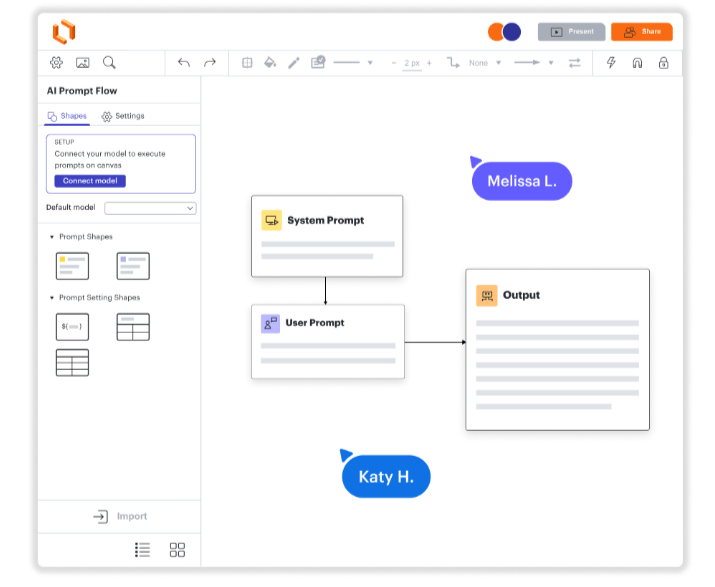
Best for: Teams that need a polished, browser-based Visio replacement with robust real-time collaboration. Lucidchart is often cited as the most direct competitor to Microsoft Visio.
- Key features:
- Large library of 1,000+ diagram templates (UML, BPMN, ERD, network)
- Real-time co-editing with @mentions and comments
- Integrations with Microsoft 365, Google Workspace, Slack, Atlassian
- Intuitive drag-and-drop interface with presentation mode
- Visio file import support: Yes—Lucidchart can import and export Visio files, enabling seamless migration and collaboration on existing diagrams
- Pricing: Free tier limited to 3 active documents and 60 shapes per diagram; paid plans start at $7.95/user/mo
- Pros:
- Mature enterprise features including SSO and admin controls
- Browser-based with no installation needed
- Excellent sharing and collaboration capabilities
- Strong integrations with Microsoft 365 and Jira
- Cons:
- Free tier is quite limited for extensive use
- Pricing can be high for large teams
Miro
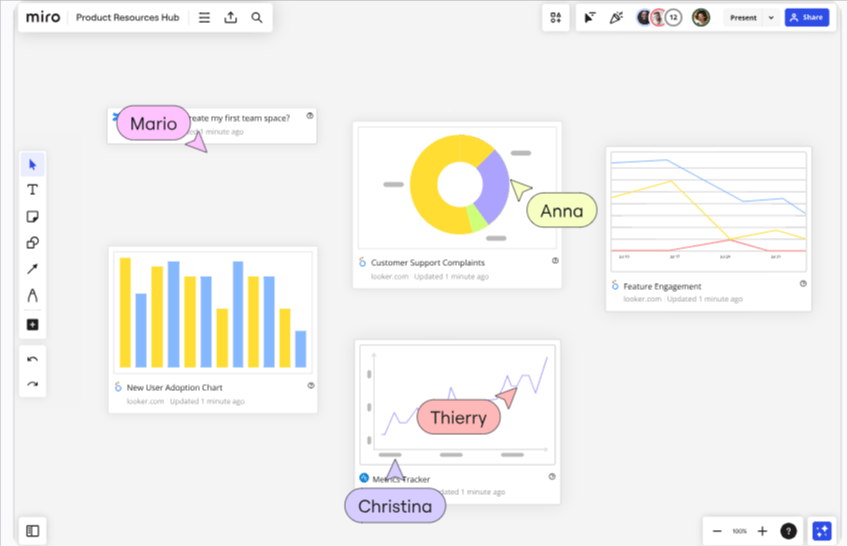
Best for: Remote teams doing brainstorming, workshops, and strategy mapping with occasional flowcharts. Miro’s infinite canvas makes it ideal for visual collaboration rather than ultra-precise technical diagrams.
- Key features:
- Infinite whiteboard canvas supporting sticky notes, mind maps, flow diagrams
- Workshop facilitation tools like timers and voting
- Integrations with Jira, Asana, Slack, Zoom
- Supports 250+ simultaneous editors for large teams
- Visio file import support: Partial—supports importing some VSDX files via apps with 75% fidelity, best suited for simpler diagrams
- Pricing: Free-forever tier includes 3 editable boards; paid plans start at $8/user/mo
- Pros:
- Excellent for workshops and collaborative brainstorming
- Highly visual and modern interface
- Strong real-time collaboration features
- Cross-platform support including mobile apps
- Cons:
- Less precise for detailed technical diagrams
- Free plan board limit can be restrictive
SmartDraw
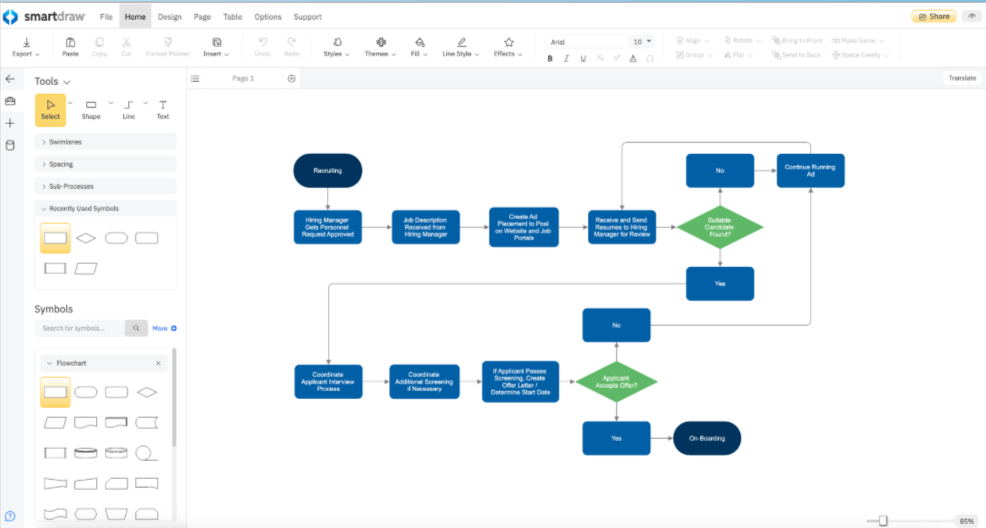
Best for: IT, engineering, and facilities teams that need strong diagram automation and top-tier Visio migration. SmartDraw is specifically designed for organizations switching from Visio and offers batch conversion of entire Visio directories.
- Key features:
- 70+ diagram types including network diagrams, floor plans, org charts
- Intelligent auto-formatting and automatic layouts
- Large symbol libraries supporting CAD exports
- Batch Visio file conversion for enterprise migration
- Visio file import support: Yes—best-in-class with 98% fidelity including complex stencils and shape data
- Pricing: No free plan; subscription starts at $9.95/user/mo billed annually
- Pros:
- Powerful automation saves time on complex diagrams
- Excellent for network and facilities layouts
- Strong corporate support and training resources
- Handles Visio files better than any alternative
- Cons:
- No permanent free tier available
- Interface feels more enterprise-focused, less consumer-friendly
Creately
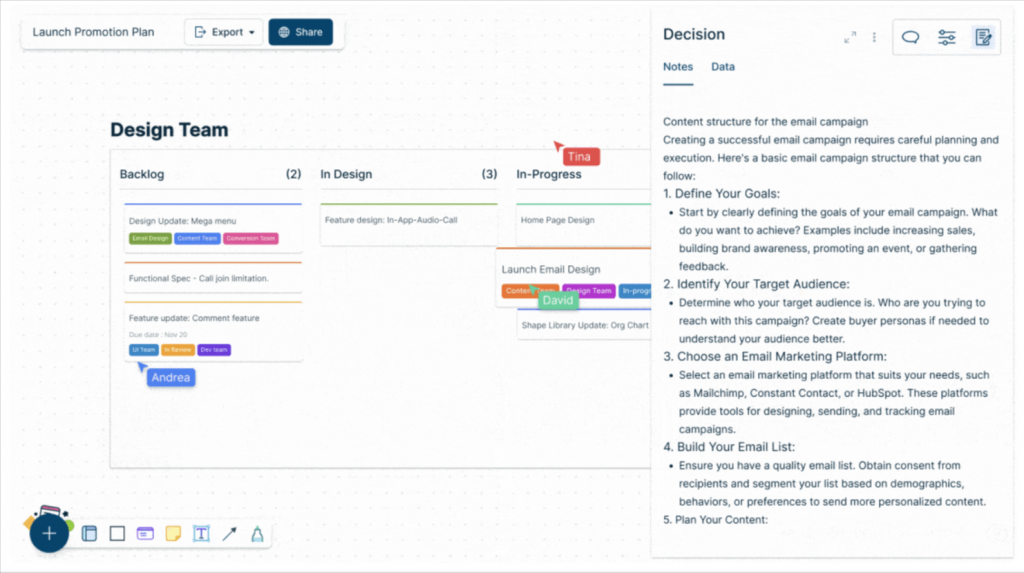
Best for: Teams that want diagrams, notes, and lightweight data in one collaborative workspace. Unlike Visio, Creately combines visual workspaces with tables and data fields.
- Key features:
- Combines diagrams with sticky notes, tables, and data fields
- Supports 50+ diagram types including user journeys and org charts
- Real-time collaboration and commenting
- Desktop and web versions available
- Visio file import support: Yes—supports importing Visio diagrams to ease migration
- Pricing: Freemium with 3 documents and 5 collaborators; paid plans start at $5/user/mo
- Pros:
- Combines diagrams with richer context and documentation
- Good for agile and product teams
- Browser-based with desktop options
- Affordable pricing for small teams
- Cons:
- Free tier has significant limitations
- Performance may vary with large or complex workspaces
No more rendering or alignment issues
Try Nifty
Gliffy
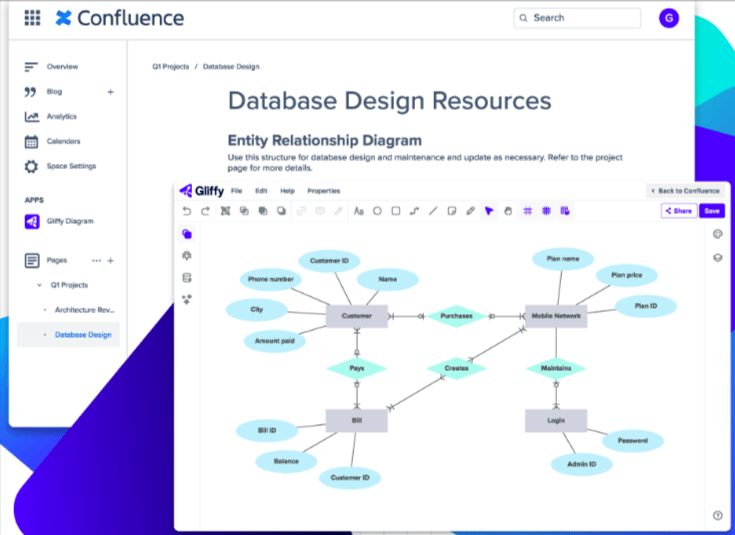
Best for: Jira and Confluence users who want diagrams directly embedded in Atlassian workflows. Gliffy dominates the Atlassian ecosystem for diagramming.
- Key features:
- Embedded diagramming in Confluence pages and Jira issues
- Templates for flowcharts, UML, network diagrams, wireframes
- Simple drag-and-drop interface
- Real-time collaboration with commenting and sharing
- Visio file import support: Partial—can import certain VSDX diagrams with limitations on complex features
- Pricing: No free plan; 14-day trial available; subscription around $10/editor/mo via Atlassian Marketplace
- Pros:
- Deep Atlassian integration for documentation-heavy teams
- Easy diagram embedding in Jira and Confluence
- Real-time remote collaboration features
- Helpful tutorials and onboarding guides
- Cons:
- No ongoing free tier
- Less feature-rich for complex technical diagrams than Lucidchart
EdrawMax
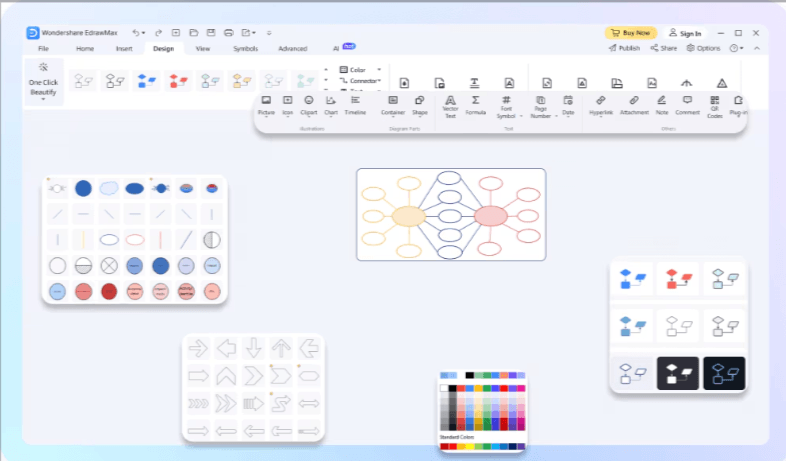
Best for: Users who want a full desktop-and-web diagram suite with a huge library of templates, similar in breadth to Visio.
- Key features:
- 280+ diagram types including flowcharts, network diagrams, UML, floor plans
- Huge library of symbols and templates
- Desktop apps for Windows, Mac, Linux plus web version
- AI-assisted themes and formatting
- Visio file import support: Yes—imports VSD/VSDX with ~90% fidelity, competitive for Visio migration
- Pricing: Limited free trial; annual licenses around $99/year; lifetime licenses available
- Pros:
- Very broad diagram support for diverse use cases
- Cross-platform availability including Linux
- Good Visio compatibility for migration
- Strong template and symbol coverage
- Cons:
- Interface can feel busy or overwhelming
- Best features locked behind paid plans
Cacoo

Best for: Small to mid-sized teams that want an online-only diagramming tool with simple real-time editing.
- Key features:
- Web-based diagramming with templates for flowcharts, mind maps, wireframes
- Real-time co-editing with in-app chat
- Integrations with Google Workspace, Slack, Backlog
- Easy sharing and export options
- Visio file import support: Limited—not a core focus of the platform
- Pricing: Freemium with up to 25 sheets; team plans start at $6/user/mo
- Pros:
- Easy to use with no software installs needed
- Cloud-native for distributed teams
- Straightforward pricing and onboarding
- Good for simple diagrams and collaboration
- Cons:
- Less suited for advanced engineering or technical diagrams
- No offline desktop option
OmniGraffle
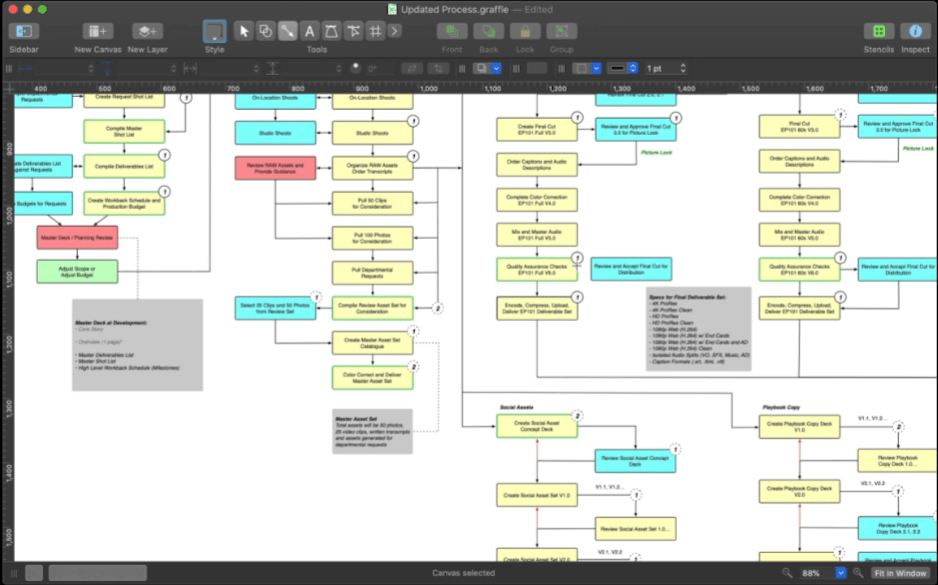
Best for: Mac and iPad users who want a native, professional diagram and vector drawing tool with precise control.
- Key features:
- Native macOS and iOS apps with precise grid and alignment tools
- Custom stencils and shape libraries
- Supports wireframing, UX flows, and detailed diagrams
- Apple Pencil support on iPad for drawing
- Visio file import support: Partial—can open and export Visio files with some limitations depending on stencil complexity
- Pricing: Trial version available; Standard license around $99 one-time; Pro around $199
- Pros:
- Native Mac performance with Quartz rendering
- Great for designers and technical Mac users
- Works offline without internet dependency
- Highly customizable professional diagrams
- Cons:
- Apple-only; no Windows or web versions
- Higher upfront cost than SaaS tools
Best FREE Microsoft Visio alternatives
For readers searching specifically for best free visio alternatives, these tools offer meaningful free tiers or are completely free.
- Draw.io (Diagrams.net): Fully free with no signup required. Diagrams.net is a completely free diagramming tool that covers a wide range of diagram types without locking features behind a paywall. Supports flowcharts, UML, network diagrams, and imports/exports VSDX. Access via app.diagrams.net or desktop apps.
- Miro: Free plan with 3 editable boards. Ideal for whiteboarding and brainstorming rather than precision technical diagrams. Real-time collaboration features allow multiple users to work simultaneously.
- Lucidchart: Free tier with 3 documents and limited shapes. Good for occasional create flowcharts and process maps; see the Lucidchart section above for full details.
- Creately: Free plan covers 3 diagrams and 5 collaborators. Suitable for students or small teams needing diagrams plus notes.
- yEd Graph Editor: Fully free desktop app for Windows, macOS, and Linux. yEd Graph Editor is recognized for its powerful automatic layout features, making it ideal for creating complex diagrams and visualizations. Visio compatibility is limited and requires conversions.
Other notable free Microsoft Visio alternatives include:
- LibreOffice Draw: A free, open-source offline diagramming tool included in the LibreOffice suite. It’s suitable for creating flowcharts, network diagrams, and technical illustrations, and works well for users who prefer offline solutions.
- Google Drawings: A web-based diagramming tool integrated with Google Docs and Google Workspace. It’s easy to use for basic diagrams and illustrations, especially when collaborating within Google Docs or Slides, though it has limitations for advanced diagramming.
- Pencil Project: An open-source prototyping and diagram tool available on multiple platforms, including mobile. It offers free templates and supports both basic and advanced diagram creation, making it a good choice for technical design and affordability.
Best online / browser-based Visio alternatives
Many users can’t install desktop software due to corporate IT restrictions or because they’re on Macs and Chromebooks. Browser-based tools solve this completely.
- Lucidchart: 100% browser-based with PWA support, real-time collaboration, and strong Visio import/export. Works on any modern OS.
- Draw.io (app.diagrams.net): Fully browser-based with optional desktop apps. Saves directly to Google Drive, OneDrive, Dropbox, or GitHub. Zero-cost visio online alternative.
- Google Drawings: Free, browser-based diagramming tool that integrates seamlessly with Google Docs for collaborative editing. Great for basic diagrams and illustrations, especially within Google Workspace, though limited for advanced diagramming.
- Miro: Browser-first with optional desktop and mobile apps. Ideal for collaboration-heavy workshops across distributed teams.
- Cacoo: Online-only SaaS diagramming for teams wanting simple web-based collaboration.
Benefits for specific users:
- Mac users bypass Visio web gaps without workarounds like Parallels
- Chromebook users get full functionality via browser standards compliance
- IT-locked environments gain SSO and audit logs without endpoint software
How to migrate from Visio to a new tool?
For most basic diagrams, migration is pretty smooth. It gets messy when your files have custom shapes, macros, or really complex layouts.
Visio file formats you’ll run into:
- .VSD — The old binary format used in Visio 2003, 2007, and 2010. Most modern tools can still read it, but you’ll get better results if you open it in Visio first and save it as .VSDX.
- .VSDX — The current default format since Visio 2013. This is the one you want for migration. Almost every alternative tool supports it.
- .VSDM — Same as VSDX, but with macros. Heads up: those macros won’t survive the move to a web-based tool.
- .VDX — An older XML format from the pre-2013 days. Some tools still read it, but VSDX works better.
Tools that handle Visio files well:
- Lucidchart — One of the smoothest Visio imports out there. Supports VSD, VSDX, VDX, and VSDM. They even offer a free migration course.
- SmartDraw — Strong VSDX import, good with shape libraries, and works on Mac.
- Draw.io / Diagrams.net — Free, reliable, and handles standard VSDX files well. Great for everyday diagrams.
- Miro — Supports direct VSDX import now, but works best with simpler files. Complex Visio diagrams sometimes fail to import.
A simple step-by-step migration:
- Open your file in Visio. If it’s an old .VSD, save it as .VSDX first — you’ll get a much cleaner import.
- Clean up the file before exporting. Delete unused layers, hidden shapes, and oversized images. Files over 40 MB often fail to import.
- In your new tool, go to Import → choose Visio → upload your file.
- Open the imported diagram and check it carefully. You’ll usually need to fix a few connector lines, font choices, or text spacing.
- Save it in the new tool’s native format and share the link with your team.
What you should expect to lose:
- Custom stencils and shape libraries — These rarely move over cleanly. You may need to rebuild custom shapes from scratch.
- Macros and automation — Anything in a .VSDM file is gone the moment you leave Visio’s desktop app.
- Some formatting — Line styles, fonts, and text spacing often need a quick manual cleanup after import.
- Linked data — If your shapes pull data from Excel or SQL, those connections will need to be rebuilt in the new tool.
A practical tip: Don’t try to move everything at once. Pick your 5 most-used diagrams, migrate them, and see how the new tool handles them before moving the rest. You’ll catch any patterns of broken formatting early instead of fixing 200 files at the end.
FAQ: Microsoft Visio and its alternatives (2026)
This FAQ addresses the most common questions when evaluating Visio vs alternatives.
Is Miro a good alternative to Visio for team collaboration?
Miro excels at real-time collaboration, workshops, and whiteboarding. However, it’s less suited for highly precise, standards-heavy technical diagrams where Visio’s depth matters.
Is there a completely free alternative to Microsoft Visio?
Yes. Draw.io (Diagrams.net) and yEd Graph Editor are truly free with no paywall. See the Best FREE section above for details.
Does Microsoft 365 include Visio for free?
No. Most Microsoft 365 plans (Business Standard, E3) do not include Visio. Visio Plan 1 ($5/mo web-only) and Plan 2 ($15/mo) are separate add-ons.
Is Visio worth the price, or should I switch?
Visio remains strong for enterprise IT teams with heavy Microsoft dependency and on-prem SharePoint integration. Most organizations can save 80%+ by switching to web-based tools with better collaboration.
Is Lucidchart better than Visio?
Lucidchart is better for browser-based collaboration and cross-platform use. Visio still has an edge for deep integration with on-prem Microsoft environments.
Is Draw.io a good replacement for Visio?
Draw.io is a strong option to replace Visio for most standard diagramming needs, such as flowcharts and network diagrams. It’s an excellent free replacement for users looking to replace Visio, though it offers less built-in real-time collaboration compared to some SaaS tools.
Can I open Visio files without Visio installed?
Yes. Lucidchart, SmartDraw, Draw.io, and EdrawMax can open VSDX files directly in browser or desktop without Visio.
What is the best Visio alternative for Mac?
OmniGraffle for native Mac users wanting precision; Lucidchart or Draw.io for those preferring browser-based tools.
What is the best free Visio alternative for Linux?
Draw.io and yEd Graph Editor both offer native Linux apps with strong diagramming capabilities.
Which Visio alternative is best for flowcharts?
Draw.io for free users, Lucidchart for structured team workflows, Creately for flowcharts within broader workspaces.
Which Visio alternative works inside Confluence or Jira?
Gliffy offers the deepest integration as an Atlassian marketplace app. Lucidchart also provides strong Atlassian integrations as another favorite tools option.
Conclusion: Choosing the right Visio alternative for your team
- If you need a free, browser-based tool and basic diagrams, choose Draw.io / Diagrams.net for its unique benefits like ease of use and no cloud dependence.
- If you need enterprise-grade collaboration and structured diagrams, pick Lucidchart or SmartDraw, which offer unique benefits such as cross-platform compatibility and industry acceptance.
- If your team manages projects and product work around diagrams, pair Miro’s whiteboards with Nifty’s project management for unique benefits in workflow integration.
- For Mac-only teams preferring native apps, OmniGraffle remains the strongest choice, offering unique benefits tailored to the Apple ecosystem.
Each alternative offers unique benefits that may make it a better fit than Visio for certain teams or workflows.Try Nifty free — connect your diagrams via Miro directly to tasks, roadmaps, and releases in a single workspace.