Skip to content
8 Best Project Management Calendar Tools

Quick Answer
The best calendar for project management combines an intuitive calendar view with task tracking, milestones, and team collaboration in one platform. For teams that need visual scheduling with drag and drop functionality, Nifty offers the strongest balance of features, ease of use, and value—especially for small to mid-sized teams managing multiple projects.
Introduction
Project calendars have become essential for modern teams juggling complex workflows. When your team uses scattered apps for scheduling, task management, and deadline tracking, problems multiply fast:
- 37% of projects fail due to lack of clearly defined objectives and milestones.
- For large projects like London’s Crossrail (valued at £26 billion), a one-year delay would cost £1.2 billion extra, equivalent to £3.3 million per day
This guide compares the best calendar tools for project management based on real-world evaluations, G2 and Capterra scores, and hands-on feature testing. Each tool was selected for its native calendar view capabilities—not just basic integrations.
How We Chose the Best Calendar Tools for Project Management
Our selection criteria focused on what actually matters for project scheduling:
- Calendar view quality: Drag and drop rescheduling, multi-project overlays, and visual clarity
- Task scheduling: Auto-adjusting due dates based on workloads and dependencies
- Team collaboration: Shared visibility, real-time updates, and communication features
- Integration capabilities: Connections with 50+ apps, including Slack, Microsoft Teams, and Google Calendar
- Ease of use: Under 5-minute onboarding times in trials
- Pricing scalability: Free plan options up to enterprise tiers.
- Milestone tracking: Dependency chains that automatically propagate date changes
Verdict: Best Project Management Calendars
- Small to mid-sized teams: Nifty – Ideal for small teams needing clear visibility across multiple projects.
- Maximum customization: ClickUp – Offers extensive customization options for complex workflows.
- Visual teams: Monday.com – Designed for teams that prioritize visual project tracking.
- Simple use with AI features: Motion – AI-driven scheduling for streamlined task management.
- Agencies with clients: Teamwork – Tailored for agencies managing multiple client projects.
- Timeline precision: Asana – Provides detailed timeline and dependency tracking.
- Integrated communications: Lark – Combines communication tools with project scheduling.
- Budget-conscious basics: Ntask – Affordable option with essential calendar features.
Quick Comparison Table
| Tool | Best For | Key Calendar Features | Integrations | Pricing |
| Nifty | Small teams needing visibility | Portfolio calendars, milestone markers, dependency linking | 100+ apps | Free; $7/user/mo |
| Lark | Distributed enterprises | Intelligent scheduling, multi-calendar views | 50+ apps | Free; $12/user/mo |
| Motion | Solopreneurs & executives | AI auto-scheduling, time-blocking | 40+ apps | $19/user/mo |
| Ntask | Budget-conscious teams | Task-to-calendar sync, milestone heatmaps | 30+ apps | Free; $3/user/mo |
| Monday.com | Creative & visual teams | Widget dashboards, drag and drop timeline views | 200+ apps | Free; $9/user/mo |
| Asana | Cross-functional teams | Timeline-calendar hybrid, baseline tracking | 100+ apps | Free; $10.99/user/mo |
| Teamwork | Agencies | Client-specific calendars, resource allocation | 50+ apps | Free; $10.99/user/mo |
| ClickUp | Power users | 7 switchable views, custom fields, AI scheduling | 1,000+ apps | Free; $7/user/mo |
8 Best Project Management Calendar Tools
1. Nifty
Nifty is a project management software built for small to mid-sized teams that want everything in one place without the usual complexity. What makes it stand out is its built-in project calendar, where you can map tasks, milestones, and deadlines in a clear, visual timeline.
Instead of just tracking dates, it helps you see how work connects across projects, so planning and execution stay aligned. If you’re looking for a calendar that actually drives project progress, not just reminders, Nifty does that really well.
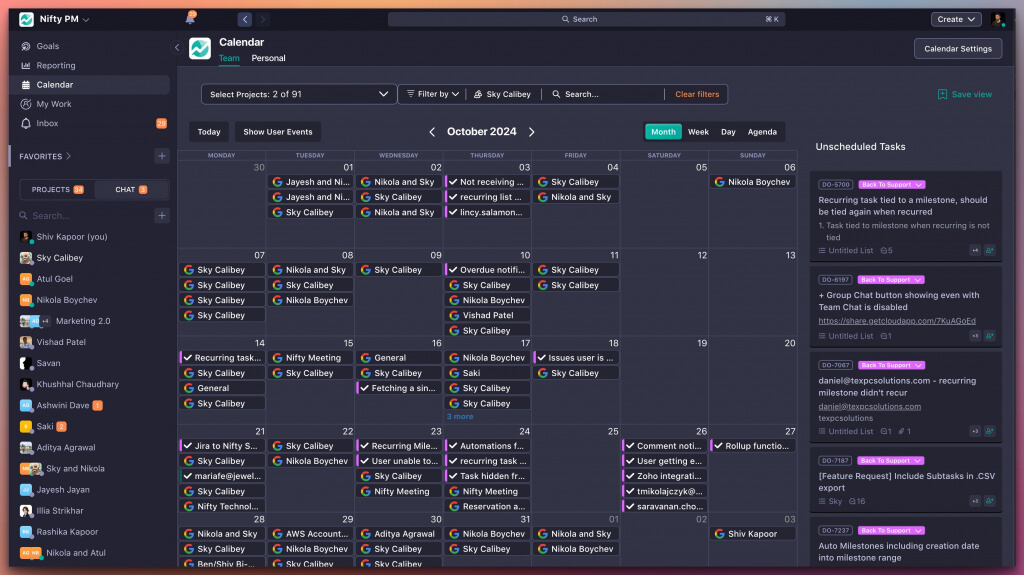
Why It Stands Out: Multi-project calendar overlays let you spot conflicts instantly across your entire portfolio—something most project management software handles poorly.
Best For: Remote teams under 20 who need a bird’s eye view of multiple projects without complexity.
Key Strengths:
- Portfolio calendars syncing multiple projects seamlessly
- Milestone markers with stakeholder notifications
- Dependency linking that automatically shifts timeline views
- Discussion threads embedded directly in calendar events
- Workload views preventing team overloads
Possible Limitations:
- Limited advanced reporting compared to enterprise tools
- Mobile app lags on custom automations
Pricing: Free plan with unlimited tasks and projects for 2 users. Paid plans start at $7/user/month.
G2 Score: 4.7/5 from 1,200+ reviews
Plan projects visually with Nifty.
Get Started
2. Larksuite
Lark, built by ByteDance, works as a full workspace where chat, docs, tasks, and scheduling all live together, so your team isn’t jumping between tools all day. The calendar is where it really clicks, meetings, tasks, and deadlines stay in sync in real time, even across different time zones. You can jump straight from a calendar event into a video call or shared doc, which makes planning and execution feel much more connected instead of scattered.
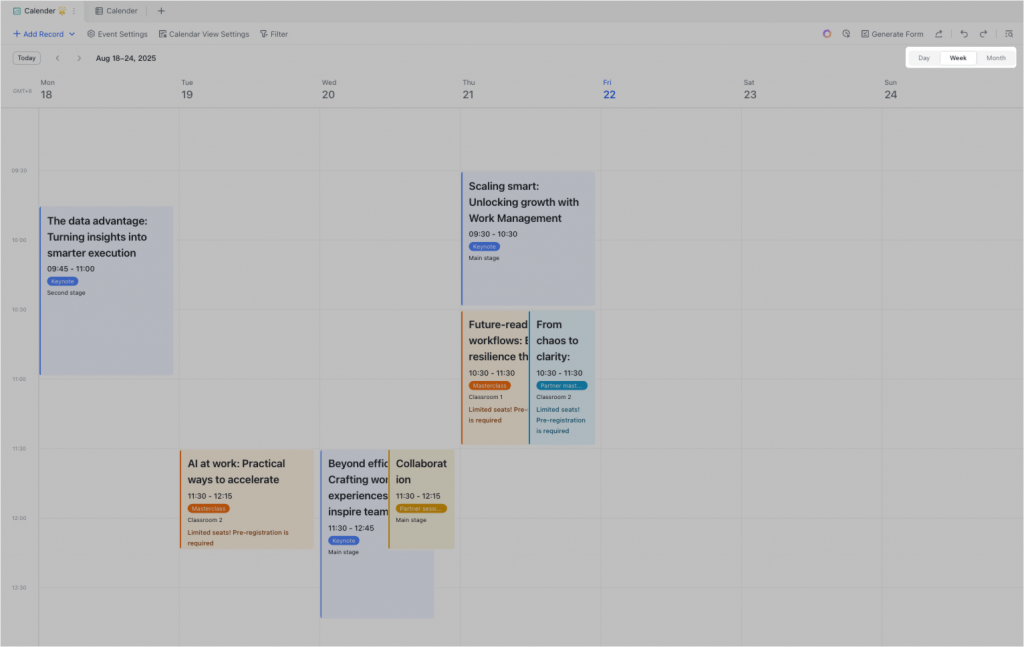
Why It Stands Out: Intelligent scheduling suggests optimal times based on team availability, eliminating the back-and-forth of coordinating meetings.
Best For: Distributed enterprises valuing seamless communication alongside project planning.
Key Strengths:
- AI-powered scheduling recommendations
- Multi-calendar views (day, week, project)
- Task assignment directly from calendar slots
- Dependency visualizations as arrows on timelines
- Automated summaries of upcoming deadlines
Possible Limitations:
- Steeper learning curve for teams not familiar with Slack-style interfaces
- Free tier caps storage at 200GB per team
Pricing: Free for unlimited users with basic features. Pro tier at $12/user/month.
G2 Score: 4.6/5 from 800 reviews
3. Motion
Motion uses machine learning algorithms trained on user habits to auto-schedule tasks into your personal calendar. The system predicts task durations from historical data and adjusts priorities in real-time—users simply input daily tasks and Motion builds the schedule. It’s AI-powered scheduling automatically adjusts project timelines based on priority and availability.
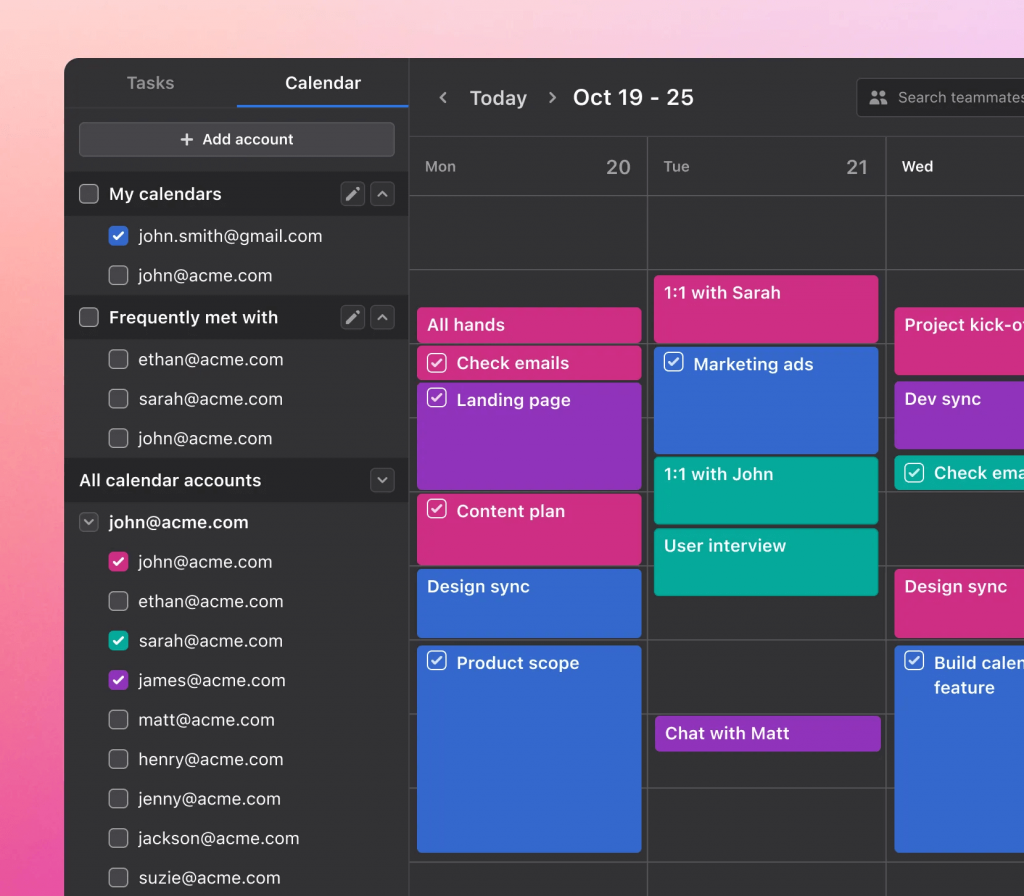
Why It Stands Out: This is the closest thing to a project manager that runs itself. You decide what needs doing; Motion figures out when.
Best For: Busy executives or freelancers with deadline-heavy workflows who want to focus on work instead of planning.
Key Strengths:
- AI-powered time-blocking that reschedules around conflicts
- Integrated task-calendar sync without manual exports
- Automatic buffer times for deep work
- Team sharing with override approvals
- Analytics on schedule efficiency
Possible Limitations:
- Less control for teams preferring manual tweaks
- Basic dependency support compared to other project management apps
Pricing: $19/user/month (no free plan available). Team discounts available.
G2 Score:4.5/5 from 500 reviews
4. Ntask
Ntask delivers minimalist calendar integration within a task-centric platform. Every task auto-populates a clean calendar view, supporting recurring events and export to Google Calendar or Outlook. White-labeling options make it attractive for agencies serving clients.
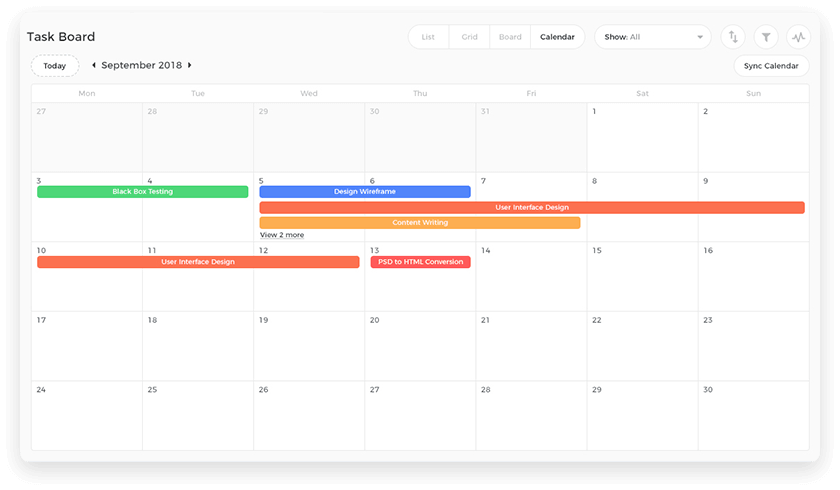
Why It Stands Out: One-click task-to-calendar mapping with the simplest learning curve of any tool on this list.
Best For: Solopreneurs transitioning to small teams who need to organize work without feature overload.
Key Strengths:
- One-click task scheduling to calendar
- Milestone heatmaps for visual planning
- Basic dependencies with automated alerts
- Client portals for shared calendar access
- Time tracking overlays on calendar events
Possible Limitations:
- No native Gantt chart functionality
- Weaker multi-project calendar views
Pricing: Free plan with unlimited projects. Paid plans start at $3/user/month.
G2 Score:4.4/5
5. Monday.com
Monday.com’s calendar is visually immersive, rendering projects as interactive timeline views with drag elements, custom columns for assignees and budgets, and automation rules that trigger notifications on approaching dates.
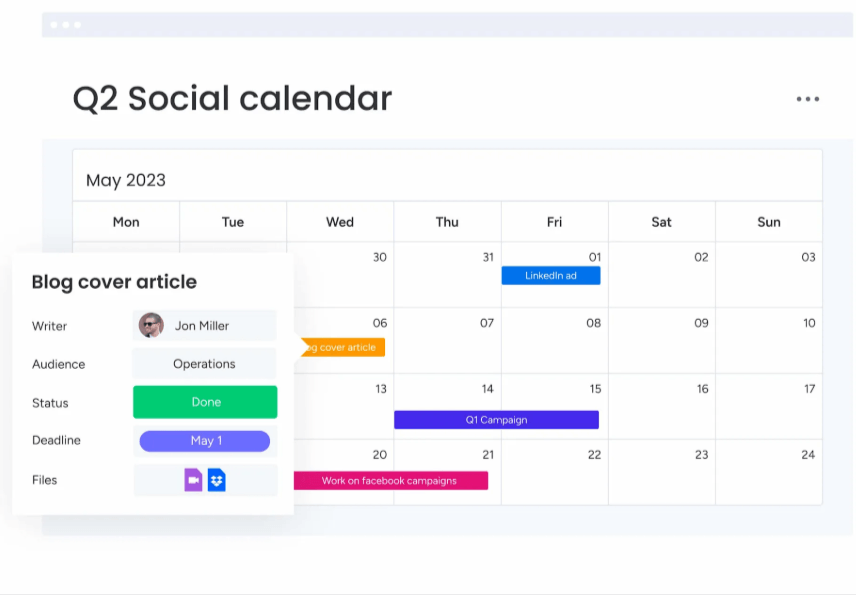
Why It Stands Out: Widget dashboards let you embed calendars alongside progress charts, resource allocation, and to do lists—perfect for teams that visualize work extensively.
Best For: Creative and visual teams who want project information displayed beautifully.
Key Strengths:
- Widget-based dashboards embedding team calendars
- Dependency columns that auto-shift dates
- Workload calendars for balancing resources
- 200+ templates for different project types
- Real-time co-editing with live cursors
Possible Limitations:
- Can overwhelm users with too many options
- Higher pricing than competitors at scale
Pricing: Free for 2 users. Basic plan at $9/user/month.
G2 Score: 4.7/5 from 15,000+ reviews
Monday.com is powerful but pricey, try Nifty.
Get Started for Free
6. Asana
Asana’s calendar view complements its renowned timeline functionality, displaying tasks by due dates with simple drag-reschedule, filters by project or person, and dependency lines that auto-adjust child tasks when parent dates shift.
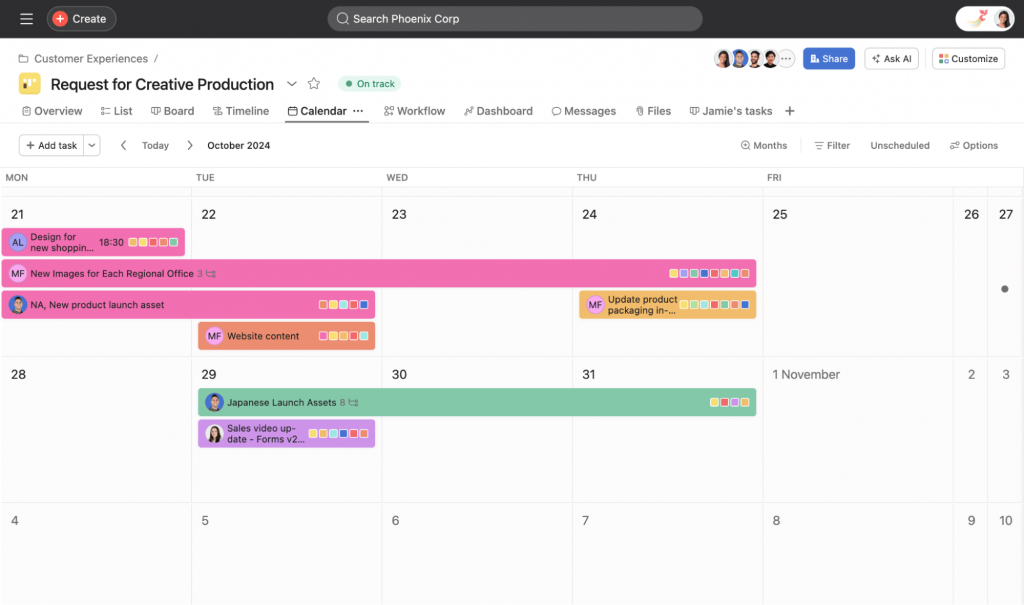
Why It Stands Out: The timeline-calendar hybrid gives both granular daily planning and high-level project tracking, with baselines for tracking variance against the original project plan.
Best For: Cross-functional teams needing precision in deadline management and workflow coordination.
Key Strengths:
- Timeline-calendar hybrid views
- Baseline tracking for schedule variance
- Portfolio rollups across projects
- Rules engine for automated alerts
- 100+ integrations with favorite apps
Possible Limitations:
- Calendar view less prominent than list views by default
- Timeline features require premium subscription
Pricing: Free Personal plan with unlimited projects for individuals. Starter at $10.99/user/month.
G2 Score: 4.3/5 from 12,000+ reviews
7. Teamwork
Teamwork targets agencies with calendars overlaying billable hours, client milestones, and risk registers. The system supports padded scheduling for profitability analysis alongside standard project calendar functionality.
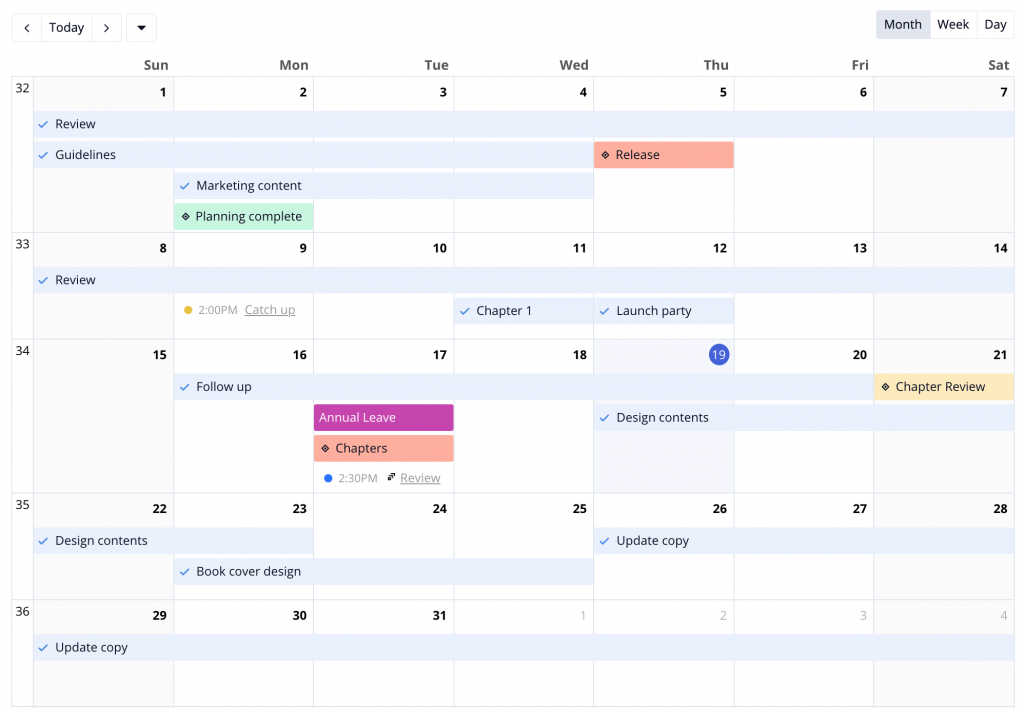
Why It Stands Out: Client-specific calendars let you share progress with external stakeholders without exposing internal operations—critical for agency workflows.
Best For: Client service businesses and agencies managing multiple client projects simultaneously.
Key Strengths:
- Client-specific calendar sharing
- Resource calendars preventing double-bookings
- Milestone links to invoicing
- Dependencies with critical path analysis
- 50+ integrations including Slack and web apps
Possible Limitations:
- Less intuitive for non-agency use cases
- Advanced reporting paywalled behind higher tiers
Pricing: Free for 5 users. Deliver plan at $10.99/user/month.
G2 Score: 4.4/5
8. ClickUp
ClickUp offers highly customizable calendar views and allows assigning tasks directly within the calendar view, offering seven switchable views (box, list, grid, and more) that users can toggle per preference. The platform maps subtasks to parent calendar events and includes AI for smart scheduling.

Why It Stands Out: Custom fields in calendar views let you track anything—budget, project type, individual level assignments—directly on the schedule interface.
Best For: Power users who want maximum flexibility and don’t mind a learning curve.
Key Strengths:
- Seven switchable calendar view options
- Automations for recurring tasks and assignments
- Sprint planning in calendar format
- Goals tracking integrated with schedule
- 1,000+ integrations across platforms
Possible Limitations:
- Feature bloat can slow navigation
- Steeper learning curve than simpler tools
Pricing: Free plan with unlimited users. Unlimited plan at $7/user/month.
G2 Score: 4.6/5 from 8,000+ reviews
When Do You Need a Project Management Calendar?
- Managing multiple projects: Portfolio calendars consolidate timelines into unified views, revealing overlaps and capacity issues. Teams using dedicated project calendars reduce context-switching.
- Tracking deadlines across teams: Color-coded team calendars enforce visibility across departments, with automated alerts cutting missed dates.
- Planning marketing campaigns: Calendar integration aligns content schedules with launch dates, incorporating approval chains directly in the timeline.
- Coordinating product launches: Dependency mapping ensures QA follows development, with milestone gates visible to all stakeholders at a glance.
How to Choose the Right Calendar for Project Management?
Choose Based on Team Size
Small teams (1-10) benefit from simple tools like Nifty, Motion or Ntask that require minimal admin overhead. Larger enterprises (50+) need scalable platforms like Monday.com or Asana with role-based permissions, audit logs, and security features.
Choose Based on Project Complexity
Simple workflows with linear tasks suit Lark’s end-to-end basics. Complex projects with multiple dependencies demand ClickUp’s custom dependency chains and critical path analysis—similar to what you’d find in legacy project management tool options.
Choose Based on Integration Needs
Prioritize tools that sync natively with your existing stack. Google-heavy teams should consider Nifty; Microsoft users will find Asana’s Outlook bridges useful. Avoid relying solely on Zapier for real-time calendar sync when native integrations exist.
Key Features to Look for in a Project Management Calendar Tool
- Task scheduling: Look for drag and drop interfaces with duration estimates. Simply drag tasks to reschedule, and the system should prevent overbooking via workload forecasts.
- Milestone tracking: Highlighted deliverables with stakeholder sharing and baseline comparisons help you track progress against original plans.
- Dependencies: Finish-to-start relationships should propagate logically—when upstream tasks delay, downstream dates shift automatically.
- Team collaboration: Features like @mentions, comments on calendar events, and real-time updates keep everyone informed without leaving the calendar. Integrating a to do list within your calendar helps organize tasks, milestones, and team collaboration for both personal and group projects.
- Integrations: APIs and native connections ensure data flows between your calendar and tools like Slack, Jira, or your personal calendar without manual sync.
- Automation: Rules like “if task overdue, reschedule and notify” can save 10+ hours per week per user. Premium features often include advanced automation builders. Time blocking combines to-do lists, emails, and calendar events into one view, streamlining your workflow.
Which Calendar Tool Is Best for You?
- Choose Nifty if you need a comprehensive project calendar with strong team collaboration and don’t want to connect multiple apps
- Choose ClickUp if customization is your priority and you want to create calendar views tailored to any workflow
- Choose Monday.com if visual project timeline management matters most to your creative or design team
- Choose Motion if you want AI to handle scheduling so you can focus on execution
- Choose Lark if your distributed team needs integrated communications alongside project planning
- Choose Ntask if you’re budget-conscious and need basic task management with calendar views
- Choose Asana if timeline precision and dependency tracking drive your project success
- Choose Teamwork if you manage client projects and need billable time tracking in your calendar
Final Thoughts
The right project calendar depends on your team size, project complexity, and existing process requirements. For most teams, Nifty offers the strongest balance of intuitive design, calendar functionality, and collaboration features without overwhelming users.
Free tiers exist across most platforms—use them to test which calendar view matches how your team actually works. The rest of your toolstack matters too: prioritize native integrations over workarounds.
The tools that help you manage deadlines efficiently while keeping teams aligned will deliver the strongest ROI. Start with the comparison table above, identify your top priorities, and test your shortlist.
FAQ
What is the best calendar for project management?
Nifty is the best calendar tool for project management because it combines an intuitive calendar view with task tracking, milestones, and team collaboration. It’s especially useful for small teams that need a simple way to manage multiple projects without switching between tools.
Can a calendar tool handle task dependencies and timelines?
Yes. Tools like Asana, ClickUp, and Teamwork model dependencies via auto-adjusting timelines. When you shift a parent task, dependent tasks move accordingly—typically using finish-to-start relationships.
Do project management calendars include reminders and alerts?
Most include automated reminders and alerts. Motion’s AI proactively reschedules tasks approaching deadlines, while tools like Nifty trigger notifications when dates approach.
Can I assign tasks directly from a project calendar?
Yes. All eight tools support direct task assignment from calendar views. Assign tasks by clicking on dates, dragging items, or using @mentions within events.
What’s the difference between a project calendar and a timeline tool?
Project calendars display tasks on time-grid views (day, week, month) for granular scheduling. Timeline tools show horizontal bars for high-level project overviews. Many tools like Nifty, Asana offer both.
Calendar vs Gantt chart: which is better for project management?
Calendars suit daily and weekly granularity for scheduling personal tasks and meetings. Gantt charts excel at long-term dependency visualization.
Can freelancers use project management calendars effectively?
Absolutely. Motion and Nifty’s free plan work well for freelancers who need to track deadlines and organize assignments without enterprise complexity.
Are there free project management calendar tools?
Yes. Asana Personal, ClickUp Free, Ntask, Nifty, and Monday.com all offer free tiers with calendar functionality. Limitations typically involve user counts or advanced features.
Is there a tool that combines tasks, timeline, and calendar in one place?
All eight tools combine tasks, timelines, and calendars natively. Nifty and ClickUp offer the most seamless integration between these views.
How do I manage multiple projects in one calendar?
Use portfolio calendars available in Nifty and Teamwork. Filter by project to see individual timelines, or view all projects overlaid to identify conflicts and resource constraints.


 2026 © Nifty Technologies, Inc. All rights reserved.