AI in Project Management: Essential Use Cases and Risks

Project managers spend much of their time turning plans into coordinated work by creating tasks, assigning owners, and tracking deadlines. They also check dependencies, collect updates, and prepare reports for AI in project management.
Moreover, this essential work is often repetitive and administrative. AI in project management can reduce that workload by helping teams structure project information.
It can draft documentation, summarize discussions, and surface gaps in the work. Moreover, it can also help project managers explore scenarios and interpret project data.
The value depends on the quality of the underlying information and whether people review the output before acting on it. Project management platforms are bringing these capabilities into the same workspace.
Additionally, this workspace is where teams already plan and deliver projects. In Nifty, Orbit AI supports project setup, document creation, and task generation.
The AI Workflow Builder creates an editable project structure from a description. Teams can also connect external AI assistants through Nifty MCP to work with authorized project information.
AI in project management: key takeaways
- AI can assist with project setup, task creation, documentation, scheduling support, workload reviews, and reporting.
- In APM’s March 2026 survey of 1,000 UK project professionals, 27% said AI was fully embedded in their workflows. Respondents reported using AI for project outcome prediction (25%), data-driven decision support (24%), and administrative support (23%).
- A McKinsey study involving 40 product managers found that generative AI reduced time spent on selected content-heavy tasks by about 40%, and content-light tasks by about 15%.
- AI outputs can be inaccurate or incomplete. Human review, clear permissions, and reliable project data remain essential.
Where AI supports everyday project management workflows
AI is most useful when it works with information that is already available and helps a team move from information to action. Common use cases include:
| Project activity | How AI can help | How teams can apply it in Nifty |
|---|---|---|
| Project setup | Turn a brief or outline into a structured starting point. | Use the AI Workflow Builder to generate project views, statuses, lists, and custom fields, then review and edit the structure. |
| Task management | Draft task details, organize action items, and reduce manual entry. | Use Orbit AI to generate tasks or convert project discussions and direct messages into tasks. |
| Capacity planning | Compare the work assigned to people with their available time. | Use Capacity Planner and Workloads to review estimates, working hours, availability, and assignment volume. |
| Risk review | Find overdue work, missing owners, and unresolved dependencies that deserve attention. | Ask a connected AI assistant to inspect authorized Nifty projects and summarize gaps for a project manager to assess. |
| Reporting | Summarize progress and prepare repeatable views of project data. | Use Nifty reporting, dashboards, roadmaps, and workload reports to monitor execution. |
How AI improves project planning and scheduling
Create a project structure from a brief
A project brief often starts as a mix of goals, deliverables, constraints, and assumptions. AI can help turn that information into a first draft of a project structure. A project manager can describe the work, review the proposed workflow, and adjust it before the team starts execution.
Nifty’s AI Workflow Builder creates a project from a description. Depending on the workflow, it can set up project views, statuses, lists, and custom fields.
Teams can start with a prompt or a ready-made workflow. They can preview the result and edit the configuration before creating the project.
Additionally, this is useful for repeatable processes such as campaign launches, product development, client onboarding, and sprint planning.

Let’s Nifty’s AI plan your next project with detailed tasks, linked milestones, deadlines and reports all done for you with just 1 prompt. See it in action.
Connect tasks to milestones and timelines
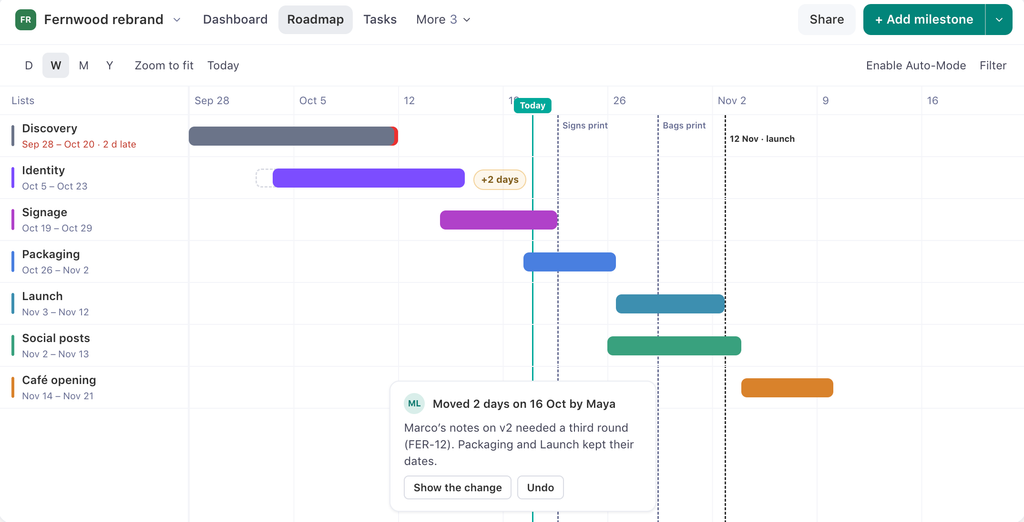
Once a project structure is in place, teams need to organize work around milestones, dependencies, and delivery dates. Roadmaps and Gantt-style views help project managers understand how tasks relate to major phases and whether a change to one activity could affect subsequent work.
AI can help draft a schedule or summarize possible conflicts, but teams should validate task duration, dependencies, and stakeholder commitments. A generated schedule is a starting point, not a delivery guarantee.
Balance workloads with capacity data
Resource allocation requires more than counting assigned tasks. Project managers need to understand the effort each task requires and whether people have enough working time available to complete it. Capacity planning makes this comparison more visible.
Nifty’s Capacity Planner compares estimated task effort with team availability, using working hours and time off to show where workloads may be stretched and where people have room for more work.

This supports better assignment decisions. It should not be described as AI-generated workload prediction: it is a capacity and workload planning capability that helps managers make informed decisions.
How AI helps project managers identify risks
AI can help review project information for warning signs that might otherwise take time to find. These include overdue tasks, work without an assignee or due date, incomplete updates, and dependencies that need attention. A connected assistant can summarize these gaps across a project or workspace, giving the project manager a clearer starting point for a risk review.
Nifty MCP connects compatible AI assistants, including ChatGPT, Claude, and Cursor, to the projects, tasks, and Docs a user is allowed to access. A project manager can ask an assistant to summarize a project, list blocked work, identify tasks without owners, or turn action items into tasks with assignees and due dates. The assistant acts within the user’s Nifty permissions, and the resulting work remains in the project workspace.
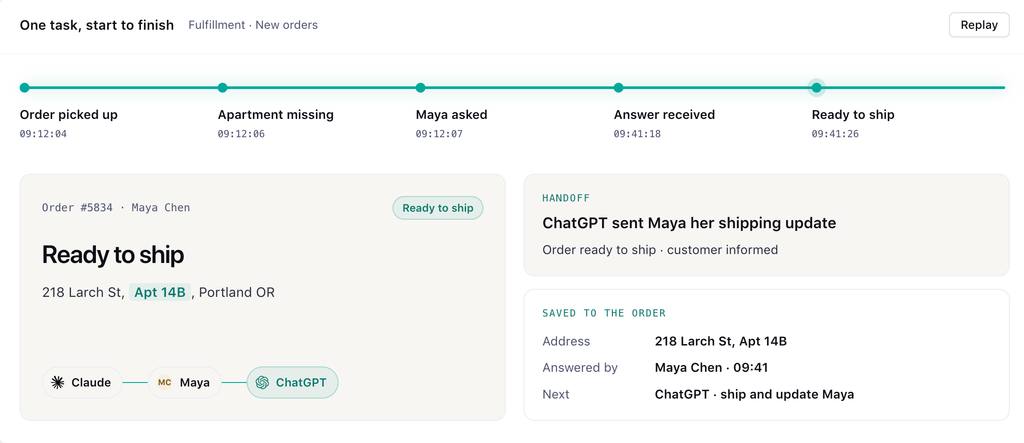
This is different from claiming that Nifty automatically predicts project failure or assigns a predictive risk score. The assistant can help surface relevant information, but the project manager still needs to validate the context, assess impact, and decide what to do.
Connect Nifty with the AI Agent you use every day. Get Started for Free.
Turn conversations into tasks and project documents
Project discussions often contain decisions and action items that need to be recorded somewhere more durable. AI can help extract the next steps, draft task descriptions, and organize follow-up work so that decisions do not remain buried in long conversations.
Nifty Orbit AI can generate task content and convert messages from Project Discussions or Direct Chat into tasks. It can use the message context to populate details such as due dates, assignees, and custom fields. Orbit AI also includes a document generator for creating project outlines and other project documentation from a description and relevant fields.

For teams using an external assistant, Nifty MCP can also help turn meeting notes or a set of action items into tasks and save drafted documents in the relevant project. The team should still confirm that the extracted actions reflect what participants actually agreed to.
To ensure all these processes run smoothly, teams that feed public data to their AI tools often buy proxy server access for such operations. It is a standard part of the data infrastructure that keeps recurring collection consistent.
Turn conversations into tasks and project documents
Project discussions often contain decisions and action items that need to be recorded somewhere more durable. AI can help extract the next steps, draft task descriptions, and organize follow-up work so that decisions do not remain buried in long conversations.
Nifty Orbit AI can generate task content and convert messages from Project Discussions or Direct Chat into tasks. It can use the message context to populate details such as due dates, assignees, and custom fields. Orbit AI also includes a document generator for creating project outlines and other project documentation from a description and relevant fields.
For teams using an external assistant, Nifty MCP can also help turn meeting notes or a set of action items into tasks and save drafted documents in the relevant project. The team should still confirm that the extracted actions reflect what participants actually agreed to.
Use AI to improve project reporting and progress tracking
Status reporting often involves collecting updates from several people, checking milestones, and summarizing what changed during a reporting period. AI can help prepare a first draft of a summary or answer questions about project data. The underlying task records and reporting views still need to be accurate.
Nifty provides reporting views for project and workspace-level progress, tasks, workloads, members, and time. Teams can build customizable dashboard reports, review roadmap progress, and export relevant reports. These views help project managers monitor execution and give stakeholders a consistent picture of project status.
A connected AI assistant can make this information easier to query. For example, a project manager could ask for a summary of open tasks, recent changes, or work that lacks an owner. The report should be checked against the underlying project records before it is shared.
Example: manage a marketing campaign with AI and Nifty
Consider a team preparing a product launch campaign. The work includes positioning, landing page production, paid campaigns, email, creative review, and launch reporting. An AI-assisted workflow could look like this:
1. Build the project: Enter the campaign brief into Nifty’s AI Workflow Builder and review the generated project structure, statuses, lists, and custom fields.
2. Organize delivery: Add milestones for messaging, creative production, landing page approval, campaign launch, and post-launch reporting. Confirm dependencies and dates with the owners.
3. Create and assign tasks: Use Orbit AI to draft task details or turn decisions from a project discussion into assigned follow-up work.
4. Check capacity: Review the team’s estimates and availability in Capacity Planner before assigning additional work.
5. Review potential gaps: Ask a connected AI assistant to identify overdue tasks, missing owners, and items without due dates. Review the findings before changing priorities.
6. Report progress: Use dashboards and roadmap reports to monitor the campaign and share a verified update with stakeholders.
The benefit is not that AI runs the campaign without oversight. It is that project information, tasks, documents, and reporting stay connected while AI reduces some of the manual work involved in coordinating them.
How to implement AI in project management without creating chaos
A controlled roll-out makes it easier to see whether AI is helping and to correct problems before they affect delivery. Start with one workflow, define what the tool can access, and measure the results.
1. Choose a repetitive workflow. Start with low-risk activities such as drafting task descriptions, summarizing project discussions, or preparing a report outline.
2. Improve the source data. Standardize project names, task statuses, assignees, due dates, estimates, and documentation before relying on AI-generated analysis.
3. Set permissions deliberately. Give connected assistants access only to the projects and actions they need. Start with read-only access when the assistant only needs to retrieve or summarize information.
4. Train the team. Explain which tasks AI can help with, what information should not be shared, and how team members should validate outputs.
5. Keep a review step. Require a person to review important schedule changes, external communications, approvals, and decisions that affect budgets or commitments.
6. Measure impact. Compare time spent on reports and administration, task follow-up completion, correction rates, and delivery performance before and after adoption.
Nifty MCP is opt-in. Connected assistants act with the authorizing user’s Nifty permissions, and teams can choose a read-only, full-access, or custom scope where supported. Data within the approved scope is shared with the selected AI provider under that provider’s terms and privacy policy, so teams should connect only providers they trust.
Where AI still needs human oversight and quality controls
AI systems can produce plausible but incorrect information, miss important context, or recommend actions that conflict with stakeholder commitments. They can also expose confidential information if teams connect services without considering data permissions and provider policies. These limitations matter in project management because a small error in an owner, deadline, dependency, or status update can affect several people.
NIST’s Generative AI Profile identifies risks that include confabulation, data privacy, information integrity, and human-AI configuration. In practical project work, these risks reinforce the need to verify AI-generated summaries, protect confidential records, keep an audit trail, and avoid relying on AI output without understanding its limitations.
Use AI for preparation, information retrieval, and repetitive coordination. Keep people accountable for priorities, approvals, trade-offs, stakeholder communication, and final delivery decisions. The goal is to make informed decisions easier, not to remove responsibility from the project team.
Conclusion: use AI to reduce coordination work, not accountability
AI can make project management more efficient by helping teams create project structures, organize tasks, draft documents, review workloads, and prepare reports. The strongest results come when AI works with reliable project data and supports a process that people already understand.
Nifty brings project planning, task management, roadmaps, documentation, reporting, and AI-assisted workflows into one workspace. Teams can use Orbit AI for project and task creation, Capacity Planner to understand workload distribution, and Nifty MCP to connect compatible AI assistants to authorized project information. People remain responsible for reviewing outputs and making delivery decisions. Sign up for free to see it in action.
What are the most useful examples of AI in project management?
Common examples include generating a project structure from a brief, drafting task descriptions, summarizing project discussions, creating documentation, reviewing workloads, and preparing status reports. AI can also help identify gaps such as overdue tasks or work without an owner. The usefulness of each application depends on the quality of project information and the level of human review.
How does AI help with project planning?
AI can turn an initial brief into a draft project structure, suggest tasks, and help organize project information. In Nifty, the AI Workflow Builder can create project views, statuses, lists, and custom fields from a description. Project managers should review the generated structure, confirm dependencies, and validate dates before using it as the working plan.
Can AI automatically assign project tasks?
Some AI tools can suggest or populate assignees based on the information available to them. Nifty Orbit AI can use message context to populate task details such as assignees and due dates when converting a discussion or chat message into a task. Teams should verify assignments before treating them as commitments.
Can AI identify project delays and risks?
AI can help surface warning signs such as overdue tasks, missing owners, incomplete updates, and dependencies that need review. A connected assistant can query authorized project information and summarize the results. It should not be treated as a substitute for a project manager’s risk assessment or as proof that a project will miss its deadline.