CRM Campaign: A Simple 2026 Guide with Real Examples

A CRM (Customer Relationship Management) system is a digital home for your customer info. It stores names, emails, and every chat you’ve ever had with a lead. A CRM acts as a centralized system, consolidating all customer data into a single CRM database that enhances marketing campaigns, improves data management, and streamlines communication efforts across various channels.
But a CRM campaign is where that data turns into profit. Instead of sending the same email to everyone, a CRM campaign uses what you know about a person to send them exactly what they need. CRM is important for managing relationships with both current and potential customers, providing a single source of truth for customer data and enabling more personalized, targeted communication.
Research shows that using a CRM can boost sales by 29% and improve team speed by 34%. Even better, companies using these tools see an average ROI of $8.71 for every dollar they spend.
This guide shows you how CRM campaigns work and why they beat old marketing methods. You will get clear steps and real examples to help you launch your own campaign with ease. With a 360° customer view, centralizing data enables all teams—sales, marketing, and support—to have a complete picture of customer interactions.
Introduction to Customer Relationship Management
Customer Relationship Management (CRM) is more than just a tool—it’s a strategy for building and nurturing strong customer relationships at every stage of the entire customer lifecycle. By using CRM software, businesses can collect and analyze valuable CRM data, turning every customer interaction into an opportunity for growth. This approach helps companies understand the needs of both existing customers and new prospects, allowing for targeted campaigns that deliver the right message at just the right time.
With effective CRM marketing strategies, businesses can personalize their marketing efforts, improve customer loyalty, and drive sales growth. CRM marketing isn’t just about selling; it’s about creating meaningful connections with individual customers, anticipating their needs, and guiding them from first contact to loyal advocate. By focusing on the customer lifecycle, companies can maximize the value of every relationship and ensure that their sales and marketing efforts work together for long-term success.
What is a CRM campaign?
A CRM campaign is a set of coordinated actions that use CRM data to manage and nurture relationships across channels. These actions are planned, targeted, and measured inside the CRM. Each campaign has a defined audience, trigger, message, and campaign goals. Clearly defining campaign goals is crucial for planning, executing, and measuring the success of CRM campaigns.
A CRM campaign uses first-party data stored in the CRM database. Common data points include lifecycle stage, lead source, company size, deal status, product usage, and past purchases. The CRM database enables companies to segment customers based on what makes them stand out from each other, allowing for more targeted marketing and optimized customer interactions. The campaign logic decides who enters, what messages they receive, and when they exit.
CRM campaigns are not limited to one channel. They often include email, sales tasks, in-app messages, SMS, ads, and phone calls. All activity is logged back to the CRM so teams can see outcomes tied to pipeline, revenue, or retention. CRM campaigns help improve and optimize relationships with customers for as long as they remain customers by managing customer interactions across all relevant channels.
CRM campaign vs. traditional marketing campaign
A CRM campaign focuses on data-driven personalization, while a traditional marketing campaign focuses on broad audience messaging.
- Audience: Traditional ads blast one message to everyone. CRM campaigns target small groups by segmenting customers based on their behaviors, purchase history, or interactions. Segmenting customers based on their unique characteristics can increase retention, loyalty, and revenue.
- The Data: Old methods use guesses and broad categories. CRM tools use real actions, like if a user signed up but didn’t finish their setup.
- Success: Instead of just counting “clicks” or “opens,” CRM campaigns track real money. They show you exactly how many demos were booked or deals were won.
Read our guide on Marketing planning
CRM campaign vs. sales outreach campaign
A CRM campaign is a series of automated messages from the marketing team. A sales outreach campaign is a set of personal tasks done by a sales person.
- Who talks to whom: Sales outreach is usually one person talking to another person (like a phone call). CRM campaigns send messages to many people at once using smart rules to keep it personal. CRM campaigns can target both existing and potential customers to nurture relationships at scale.
- Who runs it: Marketing teams usually build the logic and timing for CRM campaigns. Sales reps focus on the direct, one-on-one conversations.
- The Goal: Sales outreach tries to get a “yes” or a “no” right now. CRM campaigns focus on moving people slowly and steadily through every stage of the journey.
- How they work together: CRM campaigns can automatically remind a sales rep to call a lead at the perfect moment.
CRM campaign vs. marketing automation
The CRM is where you store the facts. The marketing automation is the tool that does the work.
- The CRM is the “Brain”: It stores all your facts, like names and how much customers spend. It tells you who should get a message and if the campaign made money. Modern CRM systems also automate data entry, reducing manual work and improving data accuracy.
- Automation is the “Hands”: This tool does the actual work. It sends the emails and decides when they should go out.
- The Full System: A great CRM campaign uses both. The CRM sets the goal, and the automation tool delivers the message.
CRM software can also integrate with other business applications to enhance functionality and streamline marketing efforts.
Guide: How to Automate your workflow?
Key Features of a CRM System
A powerful CRM system comes packed with features designed to help businesses nurture customer relationships and boost results. At its core, a CRM platform offers contact management, making it easy to organize customer information and track every interaction. Sales pipeline tracking lets sales teams see where each deal stands, while customer service tools ensure that every question or issue is handled quickly.
Marketing automation is another key feature, allowing marketing teams to set up personalized email campaigns and automate repetitive tasks. Advanced analytics provide deep customer insights, helping teams refine their marketing strategies and make smarter decisions. Integration with other marketing tools means you can connect your CRM system to your favorite apps, keeping all your data in one place.
With these features, businesses can manage the entire customer journey—from first touch to repeat purchase—while delivering the right message at the right time. The result? Stronger customer relationships, more effective marketing campaigns, and a sales pipeline that keeps moving forward.
Choosing a CRM Platform
Selecting the right CRM platform is a crucial decision for any business aiming to improve customer relationships and drive sales growth. Start by considering scalability—your CRM software should grow with your business and adapt to changing needs. Customization and integration with your existing marketing tools are also essential, ensuring a seamless flow of customer data across all your sales and marketing efforts.
Look for a CRM system that excels at managing customer data and offers targeted marketing features, such as personalized messaging, loyalty programs, and robust email marketing capabilities. These tools help encourage customer loyalty, boost customer engagement, and support your sales performance. Advanced analytics and reporting features are also important, giving you the insights needed to refine your marketing efforts and drive sales growth.
Ultimately, the best CRM platform is one that empowers your team to deliver exceptional customer experiences, streamline workflows, and nurture both new and existing customers. By choosing wisely, you’ll set your business up for long-term success and stronger, more profitable customer relationships.
Choose a CRM that grows with your team
Try Nifty for Free
Why CRM Campaigns Matter?
- CRM campaigns matter because centralized customer context improves targeting and timing.
- CRM campaigns matter because automation enables journeys and follow-ups at scale without losing relevance.
- CRM campaigns matter because they align marketing and sales around one shared plan.
- CRM campaigns matter because they support better measurement through segmentation and cohorts.
- CRM campaigns are essential for customer retention and building loyalty by leveraging personalized engagement and relationship marketing strategies.
- CRM campaigns help improve relationships with customers, leading to increased retention, business growth, and more informed decision-making.
- CRM campaigns are effective because delivering the right messaging and customizing the user experience increases the chances of retaining customers and boosting sales performance.
How to Build a CRM Campaign (Step-by-Step Guide)
Step 1: Define the objective + “one KPI that matters”
Start with one clear campaign goal and one primary KPI
The objective should reflect a business outcome, not a vanity metric. Common examples include activation rate, demos booked, renewal rate, or expansion revenue. One main KPI keeps decisions focused and prevents competing priorities during execution.
To effectively track progress toward your campaign goals, define clear KPIs aligned with your objectives, such as Customer Satisfaction Score (CSAT) and Customer Lifetime Value (CLV).
Use these templates to set your goals: Goal setting templates
Step 2: Identify ICP + audience segment
Define exactly who should enter the campaign and who should not by identifying your target audience. Entry criteria may include lifecycle stage, lead source, behaviour, or account attributes. Deep segmentation involves grouping customers by behavior, preferences, and history to send highly relevant messages. Companies can segment customers based on unique characteristics that make them stand out from each other. Exclusions and suppression lists prevent contacts who already converted, churned, or opted out from receiving messages. Clear rules protect relevance and data quality.
Turn ICP segments into organized campaigns with Nifty.
Get Started
Step 3: Map the journey (touchpoints + decision moments)
Outline the path contacts will follow from entry to exit.
A simple journey map works best: trigger, messages, call to action, and next state. Each step should reflect a decision point where the contact either progresses, pauses, or exits the campaign.
Step 4: Create a messaging matrix using CRM data
Align messaging to persona, stage, and objections.A messaging matrix maps persona, funnel stage, common objections, channel, call to action, and marketing messages. This ensures consistency across messages while keeping content focused on what matters most at each step.
Personalized content uses data to tailor emails, website content, and offers to individual interests and past purchases. Delivering the right messaging and customizing the user experience increases the chances of retaining customers.
Step 5: Build campaign assets checklist
Prepare all assets before launching the campaign. Typical assets include emails, landing pages, ads, call scripts, sales enablement content, and FAQs. Use your CRM database to personalize these assets for each segment or customer, increasing relevance and engagement. A centralized system, such as a CRM platform, helps manage and organize all campaign assets efficiently, ensuring nothing is missed. A checklist prevents last-minute gaps that delay launch or weaken performance.
See how to create a marketing plan using Nifty
Step 6: Configure automation + handoffs
Set up automation rules and define when humans step in. If-then logic routes contacts based on opens, clicks, replies, page visits, or stage changes. Sales handoffs should trigger tasks or alerts, so reps know when to follow up and why. Service teams collaborate with sales and marketing to provide consistent communication and better customer interactions by sharing access to customer histories. Proactive support uses AI chatbots for instant answers and can trigger automated service calls based on CRM rules.
AI capabilities in CRM systems can also analyze customer data to predict behaviors and recommend next steps. Using Sierra alternatives, such as Quiq, is a great way to access agentic AI features without custom coding or additional costs.
Step 7: QA before launch
Test everything before the campaign goes live.
Quality checks include links, personalisation tokens, email rendering, list accuracy, deliverability, and mobile display. QA reduces errors that can damage trust or reporting.
Step 8: Launch + monitor (first 72 hours)
Watch early signals closely after launch.
Set alert thresholds for issues such as high bounce rates, low engagement, or broken links. Early fixes prevent small problems from affecting the full audience
Step 9: Optimise (test plan)
Improve performance through structured testing.
Prioritise A/B tests on subject lines, offers, calls to action, send times, and segment logic. Testing should be planned in advance, not added randomly.
Step 10: Post-campaign analysis + reuse
Review results and document what worked.
Analyse performance against the primary KPI, note learnings, and identify new segments or triggers. Update internal playbooks so successful patterns can be reused in future CRM campaigns.
How to Run CRM Campaigns Without Chaos (with Nifty)?
Turn the CRM campaign into a tracked project
CRM campaigns run smoother when they are managed like projects, not one-off tasks.
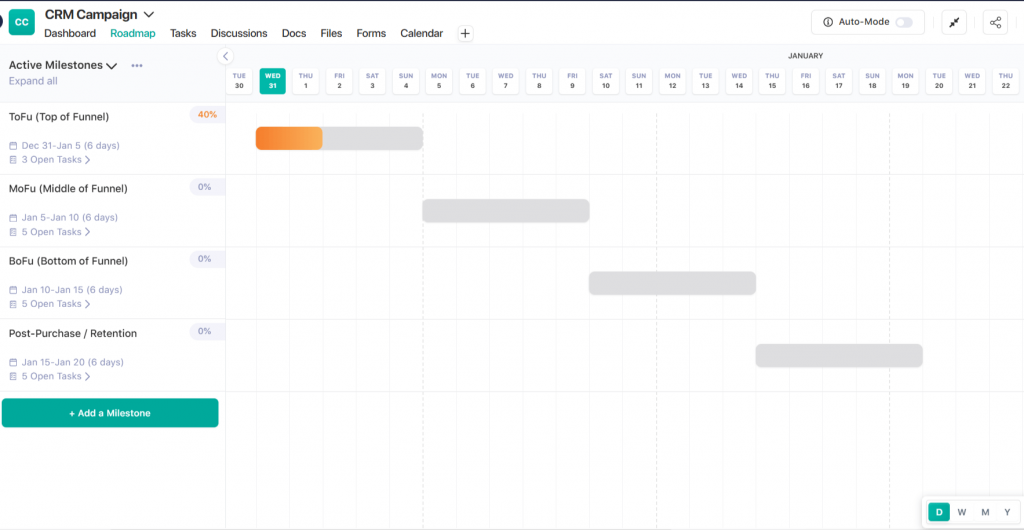
Using Nifty Milestones, teams can map campaign stages such as ToFu, MoFu, BoFu, and post-purchase lifecycle into clear phases. Each milestone group relates work and shows progress automatically as tasks are completed. This makes it easy to see what is on track, what is blocked, and what is ready to launch without manual status updates.
Get the Best Project Milestone Examples
Create repeatable execution workflows
Repeatable workflows reduce delays and missed steps.
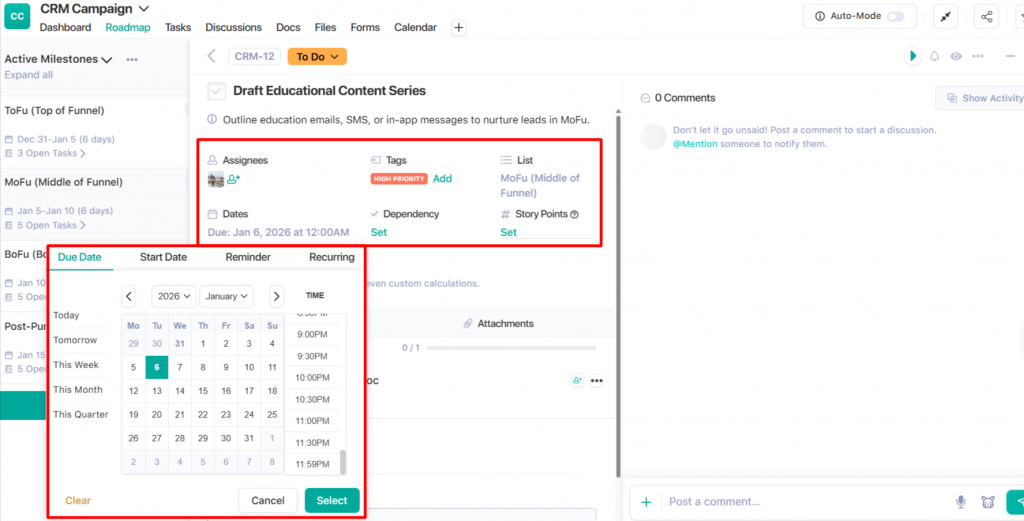
Nifty Tasks helps teams manage asset production, such as copy, design, development, and QA in one place. Each task has an owner, due date, and priority. Automation reduces back-and-forth follow-ups by moving work forward when tasks are completed. This structure supports faster execution across multiple CRM campaigns.
Keep everything connected
Centralised documentation keeps everyone aligned.
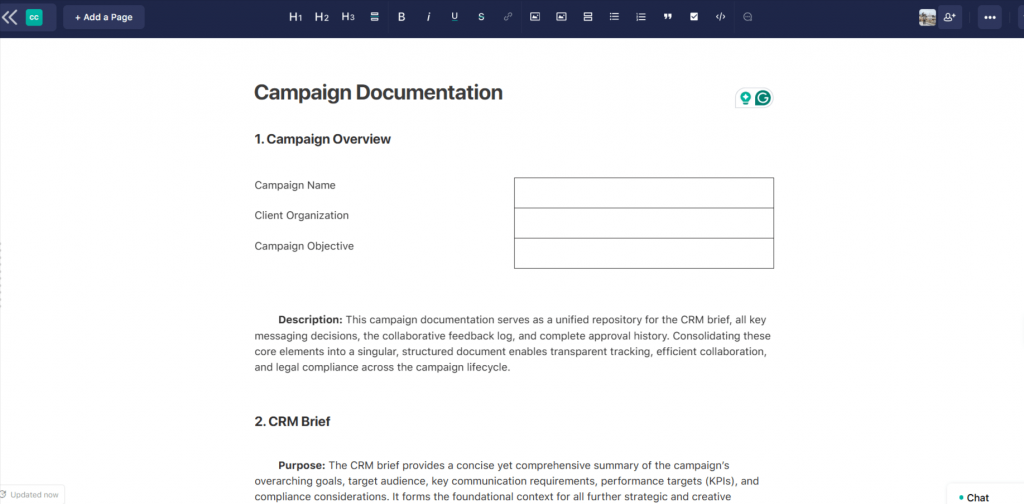
Nifty Docs and notes store campaign briefs, messaging decisions, feedback, and approval history alongside tasks. Comments remain attached to the work, creating a clear trail from planning to launch. This reduces confusion caused by scattered emails or chat threads and helps new team members understand context quickly.
Connect CRM events to execution (no manual busywork)
Linking CRM events to task creation removes manual handoffs.
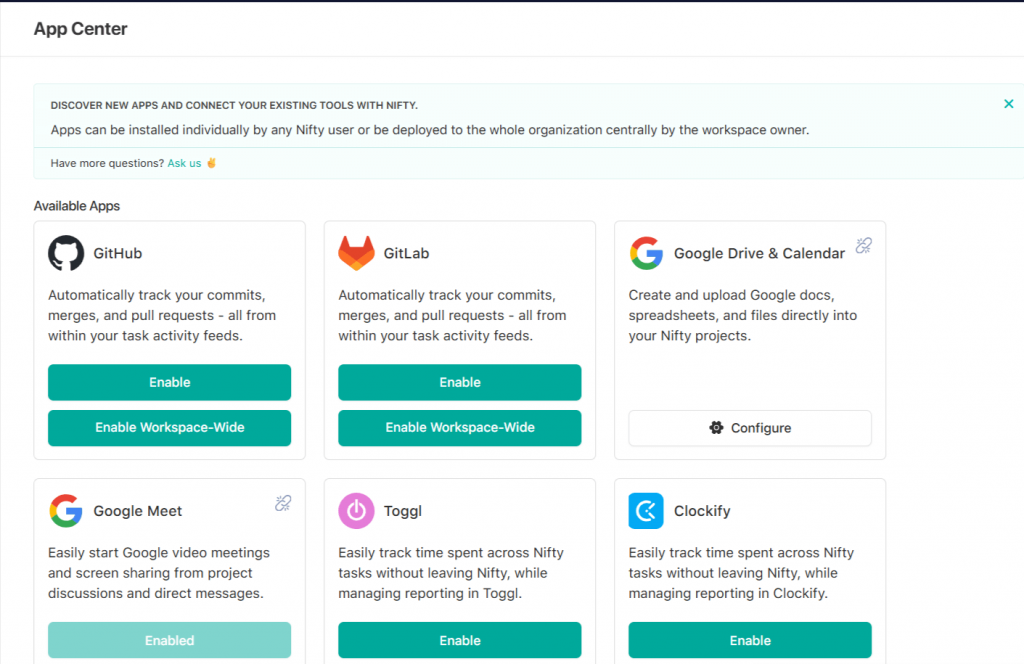
Using Nifty integrations through Zapier, teams can automatically create tasks when leads enter a segment, deals change stage, or forms are submitted. This ensures follow-ups happen on time without relying on reminders or spreadsheets. Campaign execution stays aligned with real-time CRM activity.
Run CRM campaigns with clarity, structure, and speed
Try Nifty
Best Practices and Common Mistakes to Avoid in CRM Campaigns
Best Practices
- Keep Data Clean: Fix wrong emails and delete old info. This helps you send messages to the right people.
- Watch for Signals: Don’t just look at names. Look at what people do, like visiting your pricing page. This shows they are ready to buy.
- One Goal Per Email: Give your reader only one thing to do. This makes it easy for them to take the next step.
- Work Together: Marketing and Sales should agree on who is a “good lead.” This stops people from falling through the cracks.
- Test Your Ideas: Try different email titles or times. See what works best so you can do more of it.
Common Mistakes
- Making Groups Too Small: If your target list is tiny, it is hard to see what is working. Keep groups large enough to get clear facts.
- No Testing Plan: If you don’t have a “control group,” you won’t know if your ads actually helped. Always have a baseline.
- Messy Names: Use the same names for your files and campaigns. If things are messy, your reports will be wrong.
- Too Many Apps: Don’t use ten apps at once. Start with one or two channels so you can stay focused.
Read our guide on marketing project management
Here are the Best Real CRM Campaign Examples
Welcome / onboarding sequence
Goal: Activate new leads or users
Segment: New leads or signups with no activation event
Trigger: Lead captured or account created
Sequence (4 touches):
Automated sequences are used to welcome new subscribers or customers during onboarding.
- Welcome email with setup steps
- Product walkthrough or checklist
- Educational content for the first value
- Activation reminder
KPI: Activation rate
Checkout best Email Productivity apps
Trial nurture campaign
Goal: Convert trial users to paid customers
Segment: Active trial users not yet upgraded
Trigger: Trial started or key feature not used
Sequence (4 touches):
- Trial tips and feature highlights
- Case study or customer proof
- Objection-handling message
- Upgrade reminder
Throughout the sequence, leverage the customer’s purchase history and real-time interaction data to deliver hyper-personalized messages and dynamically suggest relevant products or content, moving beyond basic personalization approaches.
KPI: Trial-to-paid conversion rate
Re-engagement campaign
Goal: Reactivate inactive leads or users
Segment: Contacts with no activity for a set period
Trigger: Inactivity threshold reached
Sequence (3 touches):
- Check-in message
- Value reminder or new content
- Final follow-up
KPI: Re-engagement rate
Renewal save campaign to boost customer loyalty
Goal: Prevent churn at renewal and maximize the customer’s lifetime value by delivering personalized renewal experiences.
Segment: Customers with an upcoming renewal and a high risk score
Trigger: Renewal window opens, or risk score increases
Sequence (3 touches):
- Renewal reminder
- Usage and value recap
- Proactive success or sales outreach
Personalized experiences are expected by consumers, and CRM systems enable companies to deliver these experiences effectively, increasing the likelihood of renewal and enhancing customer loyalty.
KPI: Renewal rate
Upsell / cross-sell campaign
Goal: Increase expansion revenue and retain customers by proactively engaging those nearing their plan limits.
Segment: Customers near usage or plan limits
Trigger: Usage threshold reached
Sequence (3 touches):
- Usage alert
- Plan or feature comparison
- Upgrade prompt
AI agents in CRMs can autonomously execute tasks such as lead scoring, sending follow-up reminders, and drafting personalized emails, helping automate upsell and retention efforts.
KPI: Expansion revenue
Win-back campaign
Goal: Re-acquire churned customers
Segment: Recently churned customers
Trigger: Churn recorded in CRM
Sequence (3 touches):
- Feedback request
- Product update or improvement message
- Tailored return offer
KPI: Win-back rate
Best CRM Campaign Tools Stack You Need in 2026
- CRM (data + segmentation)
A CRM is the foundation of any CRM campaign. It stores contact, account, and deal data and controls segmentation based on lifecycle stage, behaviour, firmographics, and activity history. The CRM database acts as a centralized system and single source of truth for customer data, ensuring consistent communication across teams and enabling targeted marketing and personalized communication throughout the customer journey. The CRM defines who enters a campaign, when they move between stages, and how results are tied to the pipeline or revenue.
- Marketing automation / ESP / SMS
Marketing automation tools handle message delivery and workflow execution. These tools send emails, manage sequences, trigger SMS or Bulk WhatsApp messages, and apply conditional logic based on user actions. They rely on CRM data for targeting and update engagement activity back into the CRM.
- Analytics + attribution
Analytics tools track how campaigns perform across channels and stages. Attribution connects campaign activity to outcomes such as conversions, deals, and revenue. Clean tracking helps teams understand which messages and segments drive results and which do not.
- Creative + landing page builder
Creative tools support asset creation for CRM campaigns. This includes email templates, landing pages, forms, and visuals. Landing page builders capture leads and feed data directly into the CRM, ensuring campaign entry points are tracked correctly.
- Campaign execution hub (Nifty)
A campaign execution hub keeps all CRM campaign work organised in one place. Nifty helps teams manage timelines, assets, approvals, dependencies, and stakeholder updates together. Tasks, documents, and milestones stay connected, which reduces execution gaps and improves visibility across marketing and sales teams.
How does CRM with Project Management help small businesses?
Conclusion
A CRM campaign turns your customer data into a plan. Instead of sending random messages, you use what you know to guide people. Each step has a clear goal you can measure.
Good campaigns need clean data and a simple plan. They help marketing and sales teams work as one. CRM campaigns are essential for building loyalty and improving relationships by focusing on personalized messaging and customer appreciation. You can send messages at the right time without doing all the work by hand. This works for new leads and old customers alike. A reliable CRM infrastructure enables companies to provide the personalized experiences consumers expect, and a well-designed CRM campaign does just that—delivering exactly what customers need.
With the right tools, you can grow your business faster. You will see what works and save time. Most of all, you will get better results with less effort.
FAQ
What is the goal of a CRM campaign?
The goal of a CRM campaign is to move leads or customers to a specific next stage using CRM data. Common goals include activation, demo bookings, trial conversions, renewals, or expansion revenue. Each campaign should focus on one primary outcome.
How is a CRM campaign different from an email campaign?
An email campaign only sends emails to a list. A CRM campaign coordinates actions across channels using CRM data. Email is one channel, but CRM campaigns also include sales tasks, in-app messages, SMS, and ads, all tracked inside the CRM.
How long should a CRM campaign run?
Campaign length depends on the goal. Short campaigns may run for one to two weeks. Lifecycle campaigns, such as onboarding or renewal, can run for several weeks or longer. The campaign should run long enough to produce measurable results.
What data do I need to run a CRM campaign?
Basic CRM campaigns require contact details, lifecycle stage, and consent status. All this information should be stored and accessed through a CRM database, which serves as a central repository for customer data and enables effective targeting. Better targeting comes from data such as lead source, engagement history, deal stage, product usage, and past purchases.
What KPIs should I track for CRM campaigns?
KPIs should match the campaign goal. Engagement KPIs include open rate, click rate, and reply rate. Conversion KPIs include demos booked, trials started, or purchases. Revenue KPIs apply to pipeline, renewals, and expansion.
Can small teams run CRM campaigns without marketing automation?
Small teams can run simple CRM campaigns manually using CRM tasks and scheduled emails. As campaign volume increases, marketing automation becomes necessary to manage timing, logic, and reporting.