Skip to content
How Project Managers Can Manage Visual Assets Across Teams

For modern teams, work doesn’t just live in tasks and timelines. It lives in files.
From campaign creatives and product mockups to brand assets and videos, visual files are at the center of almost every project. But while teams are producing more assets than ever, managing them effectively is still a challenge.
Files get scattered across tools. Versions get mixed up. Teams spend more time searching than actually working.
That’s where project managers step in.
Today, visual asset management is not just about storing files. It’s about integrating them into your project workflow, so teams can collaborate, review, and deliver work without confusion.
In this guide, we’ll break down how project managers can manage visual assets across teams, avoid common mistakes, and build a system that keeps work moving efficiently.
Key Takeaways
- Visual asset management is not just storage. It is a core part of project asset management and workflow efficiency.
- Most teams struggle because assets are not connected to tasks, communication, and approvals.
- A centralized system helps teams reduce confusion, avoid duplicate work, and improve collaboration.
- Clear ownership, version control, and structured workflows are essential for managing assets effectively.
- Connecting assets directly to projects and tasks improves visibility and speeds up execution.
- Dedicated asset platforms can help at scale, but they should support your workflow, not replace it.
- The most effective teams treat asset management as part of their daily project workflow, not a separate process.
What is Visual Asset Management?
Visual asset management is not just about storing files. For project teams, it’s about how those files move through work.
It includes the organization, storage, and tracking of creative assets like campaign visuals, product designs, videos, and brand files so that teams can access the right version at the right time, without slowing down progress.
But in reality, managing visual assets is rarely simple.
Project teams constantly deal with questions like:
- Where should assets be stored so everyone can access them?
- Who owns each file and approves changes?
- How are versions tracked across different stages of work?
- What happens to outdated or duplicate files?
- How do new team members quickly identify the correct, approved asset?
These are not just technical questions. They are workflow and ownership challenges that directly affect how efficiently a team operates.
Also read: Complete guide on creative project management
Common Visual Asset Management Challenges for Teams?
Most teams don’t struggle because they lack tools. They struggle because their asset management isn’t connected to their workflow.
At first, everything seems manageable. Files are shared, folders are created, and work moves forward. But as projects grow and more people get involved, small inefficiencies start turning into real problems.
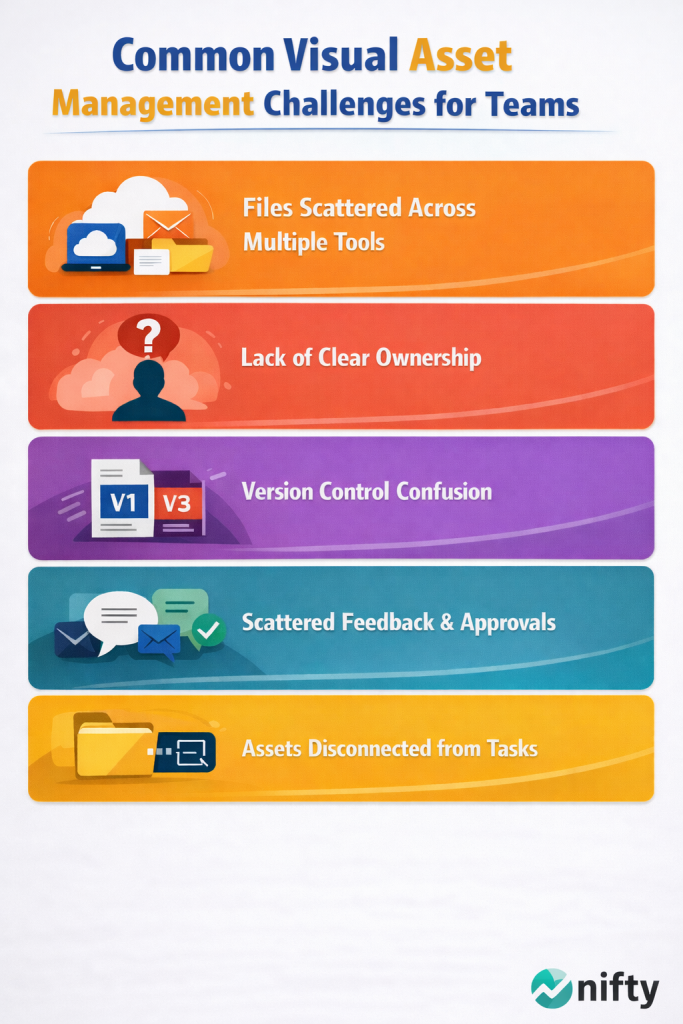
Here’s where things usually break down:
- Files are stored across multiple tools: Assets live in drives, emails, chat threads, and personal folders. There’s no single source of truth, so teams waste time searching or asking around.
- There’s no clear ownership: When no one is responsible for an asset, approvals get delayed, updates overlap, and confusion increases.
- Version control becomes messy: Multiple versions of the same file exist, and it’s not always clear which one is final. Teams risk sharing outdated or incorrect assets.
- Feedback is scattered: Comments and approvals happen across emails, Slack messages, and calls. Important context gets lost, and decisions become hard to track.
- Assets are disconnected from tasks: Files are managed separately from the actual work. This creates friction because teams constantly switch between tools just to complete a single task.
Over time, these issues compound. Teams spend more time managing files than actually using them, and project timelines start slipping.
The real problem isn’t asset management itself — it’s the lack of a unified system where assets, tasks, and communication come together.
Organize all your visual assets in one place with Nifty
Get Started
How Project Managers Should Manage Visual Assets (A Practical 10-Step Playbook)
Once the common problems are clear, the next step is building a system that actually works in real projects.
For project managers, managing visual assets is not about adding more tools. It’s about creating a clear, repeatable workflow where files, tasks, and communication are connected.
Here’s a practical 10-step playbook to manage visual assets effectively across teams:
1. Centralize assets within your project workspace
When files are scattered across multiple platforms, confusion is inevitable.
Instead, teams should aim to keep assets tied directly to their projects. A centralized workspace ensures that everyone knows exactly where to find files, reducing time wasted searching or asking around.
Using a platform like Nifty, teams can keep all project-related assets in one place, connected to the work itself.
2. Define clear ownership for every asset
Every asset should have a clear owner responsible for updates, approvals, and final versions. This removes ambiguity and ensures that decisions are made quickly without unnecessary back-and-forth.
Ownership also creates accountability. When everyone knows who is responsible for a file, it becomes easier to track changes, resolve questions, and avoid duplication of work. This is especially important in cross-functional teams where multiple stakeholders are involved in the same asset.
3. Connect assets directly to tasks and workflows
Assets should be directly connected to tasks and workflows, not managed separately.
They should be:
- attached to tasks
- reviewed within discussions
- updated as part of the workflow
This ensures that files always stay aligned with the actual progress of the project. It also reduces the need to switch between tools, helping teams stay focused and move faster without losing context.
4. Maintain proper version control
Version confusion is one of the most common problems teams face.
Instead of deleting files or overwriting versions, teams should:
- separate drafts from final versions
- clearly label approved assets
- maintain a version history
This reduces the risk of using outdated or incorrect files. A clear versioning system also makes it easier to track changes over time and revert to earlier versions if needed, which is especially useful during revisions or client feedback cycles.
5. Keep feedback and approvals in one place
Scattered feedback slows everything down.
When comments are spread across emails, chat apps, and calls, important context gets lost and decisions become harder to track.
Keeping all feedback and approvals within the same system where assets are stored helps teams move faster and stay aligned. It also creates a clear record of decisions, making it easier to revisit discussions and avoid miscommunication later in the project.
6. Use simple and consistent naming conventions
A clear file naming system makes assets easier to track and retrieve.
File names should include:
- project or campaign name
- version number
- relevant dates or identifiers
Consistency across the team eliminates confusion and saves time. Over time, a standardized naming approach also improves searchability and helps new team members quickly understand how assets are organized.
7. Organize assets for easy discovery
Most teams don’t browse folders — they search.
Assets should be grouped logically by project, type, or use case. Where possible, tagging and search features should be used to make retrieval faster.
The easier it is to find files, the faster teams can execute. Good organization also encourages reuse of existing assets, reducing duplicate work and improving overall efficiency.
8. Ensure brand and asset consistency
When multiple teams work on the same project, inconsistencies can easily creep in.
A centralized system helps ensure that:
- approved assets are easily accessible
- outdated versions are not reused
- teams follow consistent guidelines
This protects brand integrity and reduces rework. It also ensures that all outputs align with the same standards, regardless of who is creating or using the assets.
9. Build workflows that scale with your team
What works for a small team often breaks as the team grows.
As more people and assets are added, complexity increases. Having a structured system in place early helps maintain clarity and efficiency at scale.
Scalable workflows ensure that new team members can onboard quickly and that processes remain consistent even as project volume increases.
10. Make the system part of everyday work
The biggest challenge is not setting up a system — it’s maintaining it.
Teams often start with good intentions but gradually fall back into old habits, like saving files locally or sharing assets outside the system.
To make asset management work long-term, it needs to become part of the team’s daily workflow, not something used only when problems arise.
Manage assets, tasks, and teams seamlessly with Nifty
Get Started
When a Dedicated Visual Asset Platform Makes Sense?
While a structured project workflow solves most asset management challenges, some teams deal with a different kind of complexity.
As the volume of visual content grows, especially in marketing, e-commerce, and media-heavy projects, managing assets at scale becomes more demanding.
In these cases, teams may benefit from using a dedicated visual asset management platform.
These tools are specifically designed to handle:
- Large libraries of images, videos, and creative files
- Advanced tagging and metadata for faster retrieval
- Media optimization and delivery across different channels
- Secure storage and controlled access at scale
For example, platforms like Scaleflex focus on helping teams organize, optimize, and deliver visual assets efficiently, particularly when dealing with high volumes of media.
However, it’s important to understand that these platforms serve a different purpose.
They are built for asset storage and delivery, not for managing the full lifecycle of a project.
Project managers still need a system that connects assets to:
- tasks
- timelines
- team communication
- approvals
This is where a project management platform like Nifty becomes essential.
Instead of replacing your workflow, a visual asset platform can complement it. Assets can be stored and optimized externally, while project execution, collaboration, and tracking continue to happen within your project workspace.
The most effective approach is not about choosing one tool over another. It’s about ensuring that your asset management strategy supports your project workflow, not fragments it.
Wrapping up
When you manage your visual assets well, you bring focus and attention to detail to every part of a project. With organized file structures, clear ownership of each asset, and defined workflows for how files move between departments, teams spend less time searching for assets and more time using them.
The elements in my playbook are simple, not revolutionary. What makes them work is using them every day for every project and making them part of the team’s regular habits, not just something to reference when problems come up.
When you follow these principles, you see real results. If you want to reduce bottlenecks and improve outcomes, this is a high-impact investment in your team’s future.
FAQs
1. What is visual asset management in project management?
Visual asset management in project management refers to organizing, storing, and managing files like images, videos, and design assets within a project workflow. It ensures that teams can easily access the right files, track versions, and collaborate without confusion.
2. Why is visual asset management important for teams?
Without proper asset management, teams waste time searching for files, using outdated versions, or duplicating work. A structured system improves collaboration, speeds up execution, and reduces errors in project delivery.
3. What are the common challenges in managing visual assets?
Some of the most common challenges include:
- Files scattered across multiple tools
- Lack of clear ownership
- Version confusion
- Disconnected feedback and approvals
- Difficulty in finding the right asset quickly
4. How can project managers manage visual assets more effectively?
Project managers can improve asset management by:
- Using clear naming and organization systems
- Centralizing files within project workflows
- Defining ownership for each asset
- Maintaining version control
- Keeping feedback and approvals in one place
5. Should visual assets be managed inside project management tools?
Yes, managing assets within project management tools helps connect files directly to tasks, discussions, and timelines. This reduces context switching and improves collaboration across teams.
6. What is the difference between visual asset management and digital asset management?
Visual asset management focuses on handling creative files within project workflows, while digital asset management (DAM) platforms are designed for large-scale storage, tagging, and distribution of media assets. Both can work together depending on team needs.
7. When should a team use a dedicated asset management platform?
Teams should consider dedicated platforms when they handle large volumes of media, require advanced tagging, or need optimized delivery of visual content across channels.
8. How do naming conventions improve asset management?
Consistent naming conventions make it easier to identify, search, and retrieve files. They also reduce confusion and help teams quickly find the correct version of an asset.
9. How can teams avoid version confusion in visual assets?
Teams can avoid version confusion by:
- Using a centralized system for file updates
- Clearly labeling file versions
- Separating drafts from final files
- Maintaining version history
10. What is the best way to organize visual assets for teams?
The best approach is to organize assets by project, use clear naming conventions, and use tagging or search features to make files easy to find. Keeping assets connected to tasks further improves organization.



 2026 © Nifty Technologies, Inc. All rights reserved.